
Overview
Use Apollo analytics for actionable insights into your team's sales outreach efforts. You can access quick, at-a-glance data from your analytics overview page to monitor the health of your sales activities, or build customizable analytics dashboards and reports to track specific insights related to engagement, pipeline, and enrichment. In addition, you can set and track goals to ensure your team hits specific targets for email engagement, revenue, or quota.
Access to analytics depends on your Apollo plan. To access analytics, upgrade your plan or reach out to the Apollo sales team for more information.
Check out the following article to learn more about accessing analytics and leveraging Apollo's analytics overview.
Access Analytics
To access analytics, launch Apollo and navigate to Analytics.
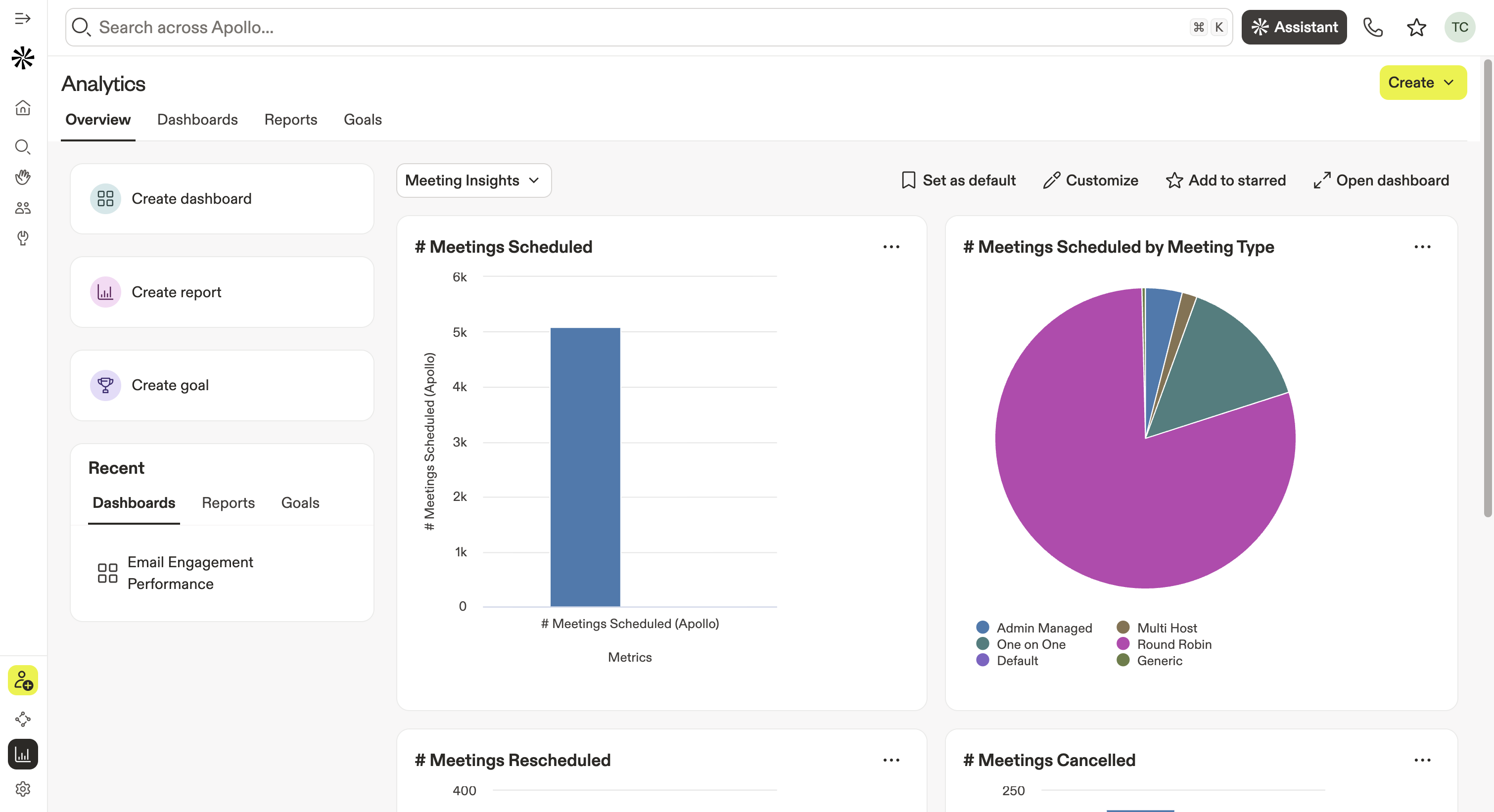
Apollo displays your analytics overview, where you can take the following actions:
- Create a dashboard: Click Create dashboard to build a new analytics dashboard from scratch or from one of Apollo's pre-built dashboard templates.
- Create a report: Click Create report to build a new analytics report from scratch or via one of Apollo's pre-built report templates.
- Create a goal: Click Create goal to set a new engagement or quota goal for your sales team.
- Review recently used dashboards, reports, or goals: Quickly access the analytics you viewed recently.
-
Monitor insights from your default analytics dashboard: Track metrics from your preferred dashboards to gain quick insight into relevant sales activities. Use the dropdown menu to select a pre-built Apollo dashboard, your personal dashboards, or the dashboards shared by your team. You can:
- Click Set as default to open your selected dashboard automatically any time you access your analytics overview.
- Click Favorite to save this dashboard to your favorites list.
- Click Open dashboard to see the full view of your default dashboard.
- Use the AI Assistant: Ask the AI Assistant in plain language to uncover key metrics related to your team's performance, allowing you to glean actionable insights quickly.
Ready to get started? Hop into Apollo to check out key insights from your analytics overview.
Next Steps
Ready to dig deeper into your data? Check out these next steps to turn your analytics into real growth momentum:
| Use Analytics Dashboards | Explore your analytics dashboards to visualize key performance trends and make smarter, faster decisions. |
|---|---|
| Use Analytics Reports | Build custom reports to measure the metrics that matter most to your team’s goals. |
| Set and Track Goals | Set and track team goals to align everyone around clear performance targets and stay accountable to results. |
| Access Email Analytics | Dive into email analytics to see which messages resonate most and fine-tune your outreach strategy. |
| Use The AI Assistant On Apollo To Sell Smarter | Use the AI Assistant in Apollo to turn analytics insights into next-best actions and boost your sales productivity. |