
Overview
Permission profiles control what users can access and manage in Apollo based on their roles and responsibilities.
Apollo includes the following default permission profiles:
- Admin: Gives users full access to Apollo, including user management, billing, permission profiles, integrations, and team settings. User management, billing, appearance, and interface permissions can't be disabled.
- Non-admin: Gives users standard access without admin-only controls. Configure this profile based on the features and actions users need.
- Billing and seat manager: A free administrative seat for users who need to manage billing, seats, account settings, analytics, and some integrations without Apollo's full prospecting and engagement features.
- Call assistant: A limited non-admin seat for users who manage meetings, conversations, and deals. Call assistants have limited prospecting and email access and can't use the Apollo Dialer.
Depending on your Apollo plan, you can also create custom permission profiles with granular controls for prospecting, engagement, billing, user management, and other Apollo features.
Permissions apply to everyone assigned to a profile, including changes you make later. Review the permissions glossary to understand the access granted by each permission.
Custom permission profiles are available on organization plans. If you need to use custom permissions, upgrade your Apollo plan. If you have questions about upgrading, reach out to the sales team.
Check out the following sections to review, create, and assign permission profiles. Team admins can also preview Apollo with a permission profile.
Permissions Glossary
Use the following glossary to understand each permission in Apollo. When you're ready, create permission profiles and assign them to users.
App Settings & Preferences
| User management & billing | |
|---|---|
| Can access the credit usage page and check how much credit other users used | Review credit usage across your Apollo team, including how many credits each user has consumed. Learn more about reviewing credit usage. |
| Can access and manage billing; receives billing related emails | Review and update your team's billing information and receive billing-related emails from Apollo. |
| Can add, edit and delete users | Add, manage, and deactivate users on your Apollo account. |
| Can invite users to join subject to admin approval | Invite teammates to your Apollo account. An admin must approve each invitation before the invited user can join. |
| Can manage permission profiles | Create, edit, and manage permission profiles for your organization. |
| Sharing & defaults | |
| Can view and edit all saved searches and sequences including private and read-only | View and edit all saved prospecting searches and sequences, including items that another user has made private or read-only. |
| Can manage team sharing & defaults | Manage sharing and default settings for your team's saved People and Companies searches from Settings > Users & teams > Sharing and defaults. |
| Integrations | |
| Can edit integrations settings | Connect integrations and manage settings such as field mappings and automatic synchronization. |
| Can invite users from CRMs to the platform and configure settings for automatic invites | Invite teammates from a connected CRM and manage whether Apollo automatically invites CRM users. |
| Can authorize third-party apps/integrations via OAuth | Authorize third-party applications to access Apollo through OAuth. |
Prospecting
| Prospecting | |
|---|---|
| Prospecting | Toggle to allow users to prospect for people and companies in Apollo. |
| Can access the prospect searcher and add new leads to contacts | Find people and companies and save new prospects as contacts or accounts in Apollo. |
| Can manage saved searches | Create, edit, and manage saved People and Companies searches. |
| Context | |
| Can modify team level Context | Edit the company and team information Apollo uses as context when generating AI-powered research, recommendations, and content. |
| Persona | |
| Can add/edit Persona | Create personas and manage existing personas. |
| Scoring models | |
| Can edit and delete team-managed scoring models | Edit and delete scoring models managed by your team. |
| Signals | |
| Can edit and delete team-managed signals | Edit and delete signals managed by your team. |
| Buying intent | |
| Can edit intent topics setting | Select and manage the buying intent topics your team tracks. |
| Territories | |
| Can add or edit Territories & Territory Rules | Create and manage territories and territory rules. |
| Finder (People and Company search) - Can reps prospect outside of their assigned territories | Controls whether users can find and prospect people or companies outside their assigned territories. |
| Lists - Can assigned reps view records outside of their assigned territories | Controls whether users can view list records outside their assigned territories. |
| Can include owned accounts in territory filters | Controls whether users can see accounts they own in territory-filtered results when those accounts fall outside their assigned territories. |
| Bulk actions | |
| Can take bulk actions (enrichment, add to sequence, add to list) on the People and Companies tab | Enrich multiple records or add multiple records to a sequence or list at the same time when prospecting. |
Data & Enrichment
| Waterfall enrichment | |
|---|---|
| Waterfall enrichment | Toggle to allow users to access and use waterfall enrichment. |
| Data enrichment | |
| Data enrichment | Toggle to allow users to access Apollo's data enrichment features. |
| Can submit Enrich All, Push All, or Pull All actions from the CRM Enrichment and integrations settings pages | Run bulk enrichment and bulk CRM synchronization actions, including enriching all eligible records or pushing and pulling records between Apollo and a connected CRM. |
| Can submit multiple job changes or push actions at once from the Job Change Alerts and Search pages | Apply multiple job changes or push multiple updated records to a connected CRM at the same time. |
| Contacts and accounts | |
| Contacts and accounts | Toggle to allow users to access and manage saved contacts and accounts in Apollo. |
| Contacts | |
| Can delete contacts owned by | Controls whose contacts users can delete. Access can include all contacts, contacts owned by the user or without an active owner, only contacts owned by the user, or no contacts. |
| Can change ownership for contacts owned by | Controls whose contacts users can reassign. Access can include all contacts, contacts owned by the user or without an active owner, only contacts owned by the user, or no contacts. |
| Can assign owner for contacts to | Controls whether users can assign contacts to any active user, users on their assigned teams, or only themselves. |
| Can bulk import Contacts via CSV | Import contacts from a CSV file. |
| Can add or edit contact roles | Edit a saved contact's job title or role from the contact profile. This permission applies to CRM-specific contact information, not general contact editing. |
| Can merge contacts | Merge duplicate contact records. |
| Accounts | |
| Can delete accounts owned by | Controls whose accounts users can delete. Access can include all accounts, accounts owned by the user or without an active owner, only accounts owned by the user, or no accounts. |
| Can change ownership for accounts owned by | Controls whose accounts users can reassign. Access can include all accounts, accounts owned by the user or without an active owner, only accounts owned by the user, or no accounts. |
| Can assign owner for accounts to | Controls whether users can assign accounts to any active user, users on their assigned teams, or only themselves. |
| Can bulk import Accounts via CSV | Import accounts from a CSV file. |
| Can merge accounts | Merge duplicate account records. |
| General | |
| Can export contacts/accounts as CSV | Export contact and account records from Apollo to CSV files. |
| Can add or edit contact stages and account stages | Create and manage the stages available for contacts and accounts across your organization. |
| Can add or edit definitions of custom fields | Create and manage custom fields for standard Apollo records, such as contacts and accounts. |
| Can add or edit definitions of custom fields for custom objects | Create and manage fields for your organization's custom objects. |
| Lists | |
| Can delete lists created by others | Controls whether users can delete contact or account lists created by other Apollo users. |
Engage
For non-admin on Apollo, access to sequences created by other users depends on both your permission profile and whether the sequence creator shared access with you.
Use the email visibility permission with caution. If you extend the permission can see all emails from other users to users, those users have access to view every other user's email activity, including those not sent directly in Apollo.
If you have a large team and are concerned about email confidentiality, Apollo recommends that you extend the permission can see outbound emails sent within the Apollo platform and replies to those emails, but not other emails instead. This ensures users can only see the emails sent and replied to through Apollo.
| Sequences | |
|---|---|
| Sequences | Toggle to allow users to access and use sequences. |
| Can add sequences | Create sequences. |
| Can manage sequence rulesets | Create and manage sequence rulesets for your organization. |
| Can edit email priority settings | Manage the order in which Apollo prioritizes sequence emails for your team. |
| Can add or edit email schedules | Create and manage sequence sending schedules. |
| Templates and snippets | |
| Can add email snippets | Create reusable email snippets. |
| Can edit snippets owned by | Controls whether users can edit snippets owned by all users, users on their assigned teams, or only themselves. |
| Can add email templates | Create email templates. |
| Can edit templates owned by | Controls whether users can edit templates owned by all users, users on their assigned teams, or only themselves. |
| Emails | |
| Emails | Toggle to allow users to send and manage emails in Apollo. |
| Email visibility | Controls which emails users can view in Apollo. Access can include all emails from other users, only emails sent through Apollo and their replies, or only the user's own emails. |
| Can send emails from | Controls whether users can send emails from mailboxes owned by all users, users on their assigned teams, or only themselves. |
| Can send emails to contacts | Controls whether users can email any contact or only contacts they own. |
| Can send emails to accounts | Controls whether users can email contacts at any account or only contacts at accounts they own. |
| User can adjust their own email sending limits | Change the daily and hourly sending limits for their own mailboxes. |
| User can edit their email signature | Create or update the email signature Apollo adds to their emails. |
| User can disable opt-out message | Remove the opt-out message appended to their sequence emails. When this permission is not granted, Apollo requires the opt-out message for users assigned to the profile. |
| User can access domain and email purchase flow | Purchase domains and mailboxes through Apollo. |
| Calls | |
| Calls | Toggle to allow users to access and use Apollo's calling features. |
| Can view and filter for Active calls | View calls currently in progress across their team. |
| Join call mode |
Determines how users can participate in another user's live call:
|
| Can add or edit call dispositions / purposes | Create and manage your team's call purposes and dispositions. |
| Can add, edit, and delete recording rules | Manage the rules that determine when Apollo records calls. |
| AI Content Center | |
| AI Content Center | Toggle to allow users to access and configure the AI Context Center, which provides company and team information to Apollo AI. |
Win & Close
| Conversations | |
|---|---|
| Conversations | Toggle to allow users to access Conversations and review recorded meetings based on their visibility settings. |
| Can view recorded meetings hosted by | Controls whether users can view recorded meetings hosted by all users, users on the same teams, only themselves, or selected teams. |
| Can edit settings in Configurations > Conversations | Manage recording, transcription, and other team-wide Conversations settings. |
| Can edit Conversation scorecards | Create and manage scorecards used to evaluate recorded conversations. |
| Deals | |
| Deals | Toggle to allow users to access and manage deals in Apollo. |
| Can access & view Deals data | View your team's deal records and related data. |
| Can delete deals owned by | Controls whose deals users can delete. Access can include all deals, deals owned by the user or without an active owner, only deals owned by the user, or no deals. |
| Can assign owner for deals to | Controls whether users can assign deals to any active user, users on their assigned teams, or only themselves. |
| Can edit the default currency | Change the default currency applied to your organization's deals. |
| Meetings | |
| Meetings | Toggle to allow users to access and use Apollo Meetings. |
| Can manage Inbound router | Create and manage inbound routers that qualify and route prospects to the appropriate team members. |
| Can manage round robin meetings | Create and manage round robin meetings for your team. |
| Can view and manage other team members meetings | View and update meeting links and meeting settings owned by other members of their team. |
| Can manage meeting intake forms | Create and manage the forms prospects complete when booking meetings. |
| Calendar Events visibility | Controls whether users can view all calendar events, other users' events that include at least one external participant, or only their own events. |
Tools & Automations
| Tasks | |
|---|---|
| Tasks | Toggle to allow users to access and manage tasks in Apollo. |
| Can complete, skip, or modify tasks owned by other users | Update or complete tasks assigned to other Apollo users. |
| Workflows | |
| Workflows | Toggle to allow users to access Apollo workflows and playbooks. |
| Can view workflows | View workflows shared with them. |
| Workflows super admin access | View, edit, and share all workflows created by your team, regardless of the workflow's sharing settings. |
| Can create playbooks | Create playbooks for use in Apollo workflows. |
| Can view private playbooks | View playbooks that another user has made private. |
| Can manage playbook rulesets | Create and manage the rulesets applied to playbooks. |
| Can edit playbooks | Controls which playbooks users can edit based on the selected ownership and visibility scope. |
| Analytics | |
| Analytics | Toggle to allow users to access Apollo analytics. |
| Can view all analytics reports and dashboards | View all analytics reports and dashboards created by your organization. |
| Can edit or delete all reports and dashboards | Edit or delete any analytics report or dashboard, including those created by other users. |
| Standalone form enrichment | |
| Standalone form enrichment | Toggle to allow users to access standalone form enrichment. |
| Can manage forms | Create and manage form enrichment configurations, including tracked domains, enrichment options, field mappings, credit limits, and submitted contacts. |
| Website visitors | |
| Website visitors | Toggle to allow users to access website visitor data in Apollo. |
| Can manage website visitors | Set up and manage website visitor tracking, including adding or removing tracked domains, choosing company- or contact-level tracking, configuring intent criteria, accessing the tracking script, testing connections, and viewing visitor data. |
Create a Custom Permission Profile
To create a custom permission profile:
- Launch Apollo and click Settings > Users & teams > Permission profiles.
- Click New Profile.
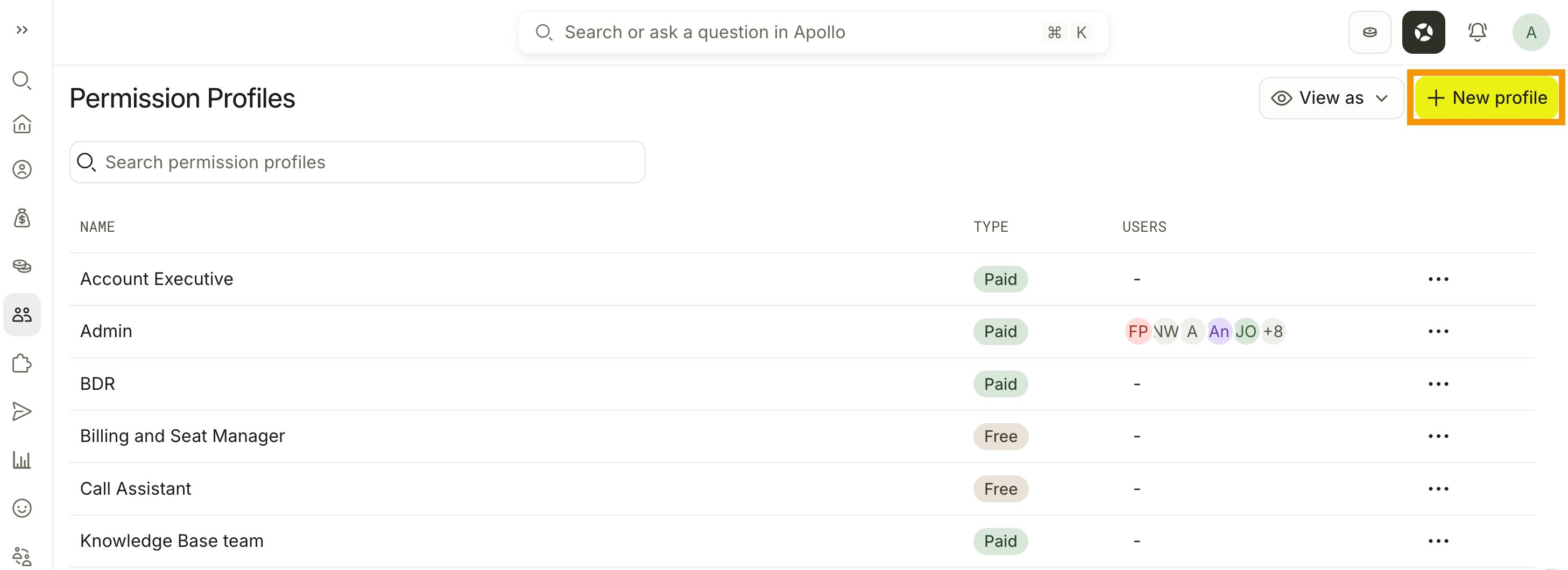
- Enter a name for the profile, then click Create.
- Toggle to enable the Apollo features you want users assigned to this permission profile to have access to.
- Configure the permissions for each feature. Review the permissions glossary to understand what each permission allows.
- When finished, click Save Changes.
You have now created a custom permission profile. You're ready to assign the permission profile to users.
To edit a permission profile, go to Settings > Users & teams > Permission profiles. Click ... beside the permission profile > Edit. Update the assigned permissions, then click Save Changes.
Changes apply to every user assigned to the permission profile.
Assign a Permission Profile
To assign a permission profile:
When you invite a new user to Apollo, select the permission profile that matches their role.
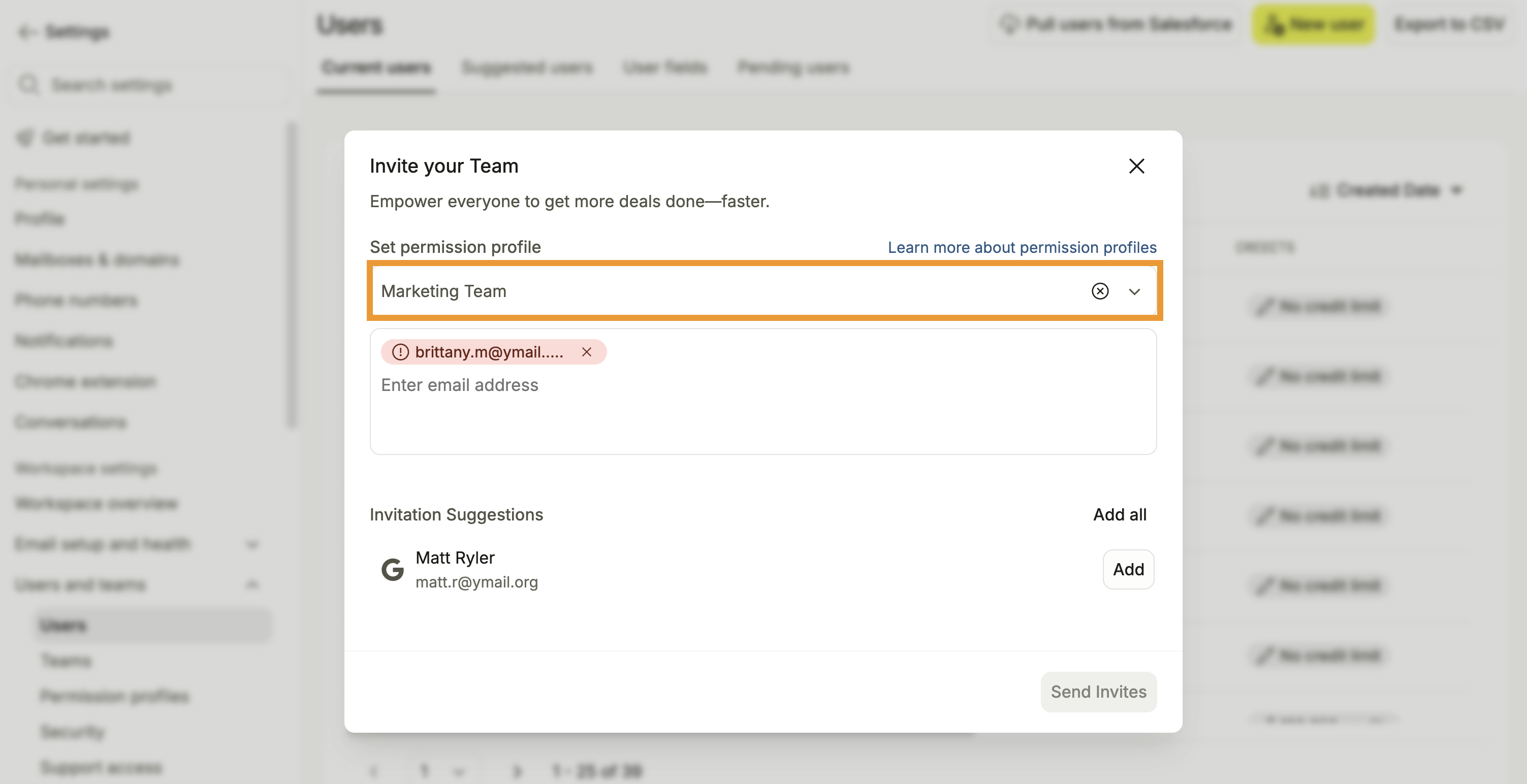
Learn more about adding new users on Apollo.
- Launch Apollo and click Settings > Users & teams > Users.
- Select the person or people you want to update, then click Edit permission profiles.
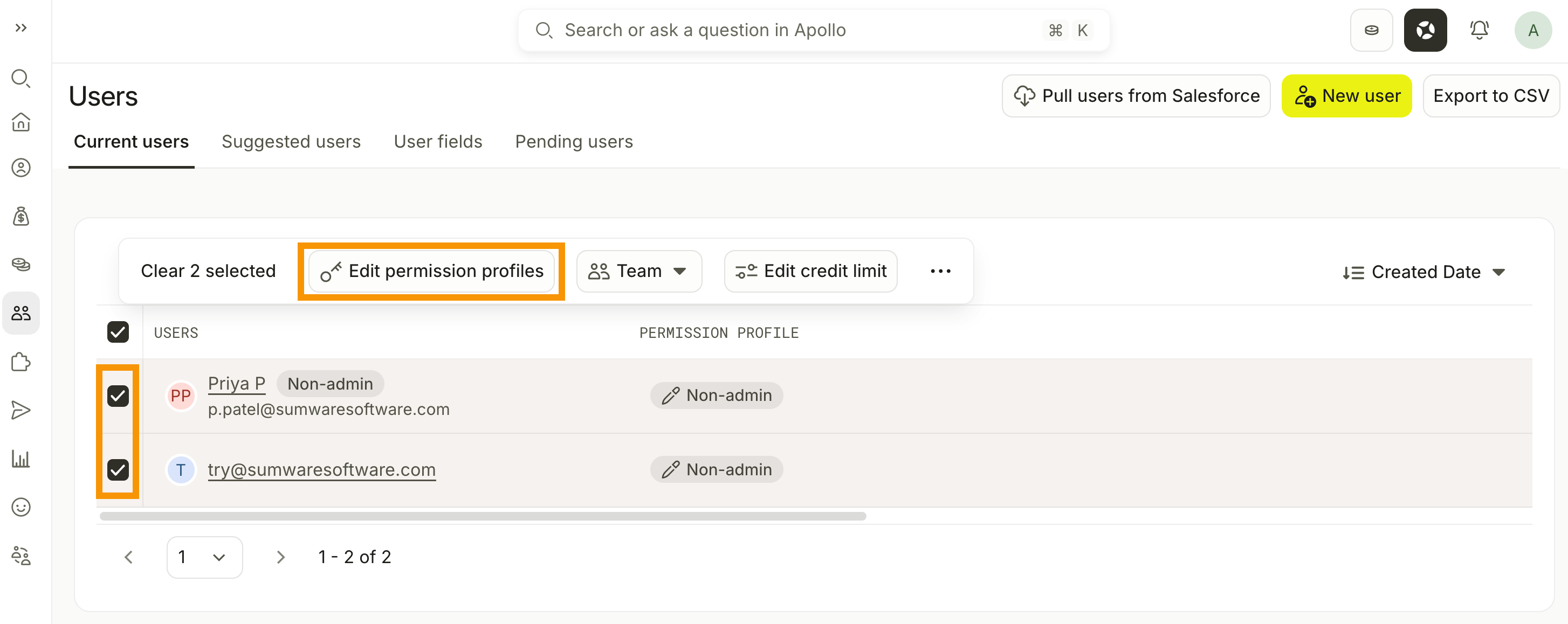
- Select the updated permission profile you want to assign, then click Save.
The updated permissions apply to the selected users immediately.
Preview Apollo with a Permission Profile
Team admins can use View as to preview what users with a permission profile can see and access across Apollo. You can preview a profile before or after assigning it to users.
Previewing changes what you see, not anyone's permissions. Actions still use your actual permissions, and some areas may not fully reflect the selected profile.
To preview a permission profile:
- Launch Apollo and click Settings > Users & teams > Permission profiles.
- Click View as.
- Search for or select the permission profile you want to preview.
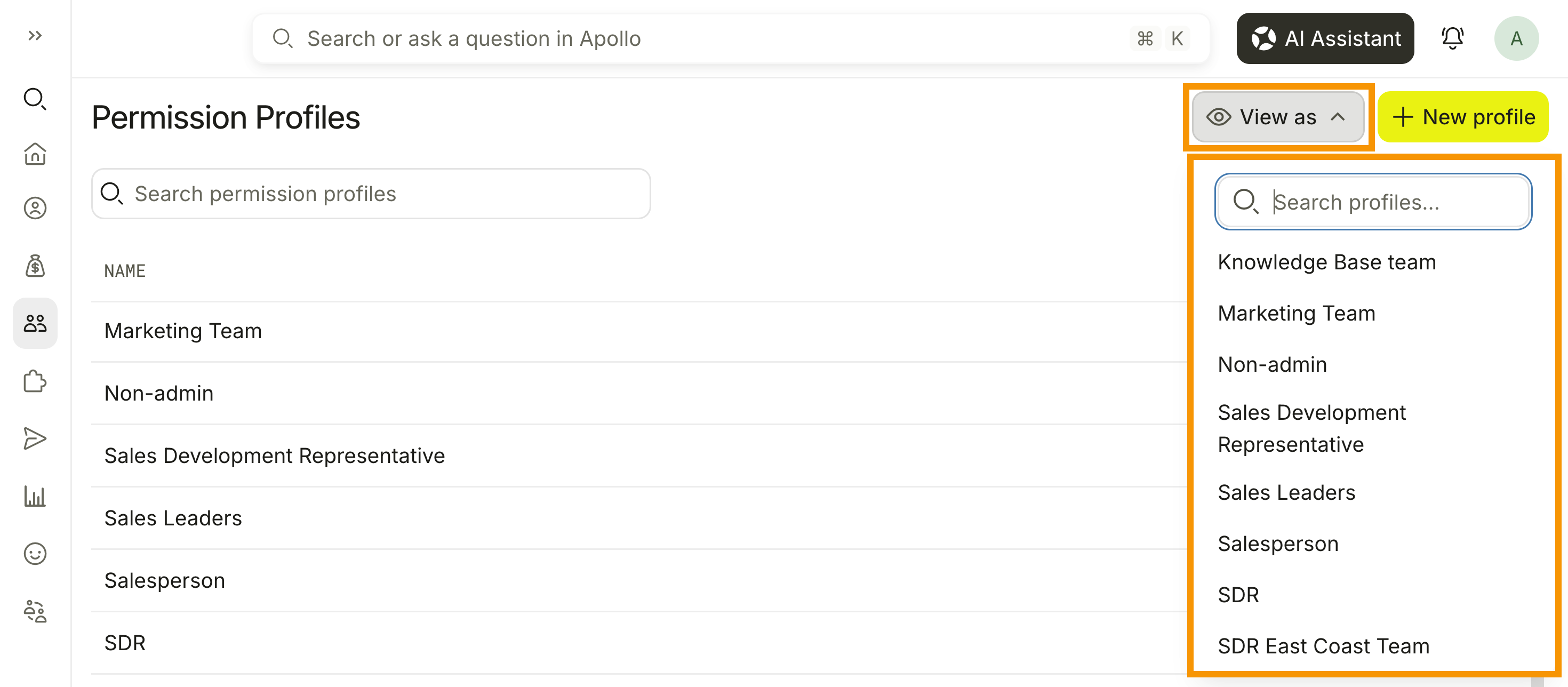
- Review Apollo, then click Stop viewing as in the pinned banner when you're finished.
You have now previewed Apollo with a permission profile.
Next Steps
Keep your team organized and give the right people the access they need.
| Add, Manage, and Deactivate Users | Add, manage, and deactivate users to keep your Apollo team current as people join, change roles, or leave. |
|---|---|
| Assign Billing and Seat Managers as Collaborators in Your Team | Assign billing and seat managers to let operations and leadership manage administrative work without a full Apollo seat. |
| Manage Your Billing Information in Apollo | Manage your billing information to update payment details, invoices, and subscription settings for your team. |
| Prospect with Territories | Create and manage territories to focus each rep on the right accounts and prevent duplicate outreach. |
| Review Credit Usage in Apollo | Review credit usage to see how your team uses credits and keep spend on track. |