
Overview
The dialer lets you make and receive calls directly on Apollo, so you can reach prospects faster.
You can get an Apollo phone number in dozens of countries around the world, enabling you to make international calls where ever your market is located.
All paid Apollo plans include US or Canada phone number registration and dialing. If you need to dial internationally, upgrade your plan to get the advanced dialer add-on. If you have questions about upgrading, reach out to the Apollo sales team.
Check out the following sections to learn more about supported countries on the dialer.
Supported Countries for International Phone Number Registration
Check out Twilio phone number regulations for more information on the regulatory requirements for obtaining a phone number in each country.
Countries excluded from this list aren't supported. To request that Apollo add support for a country, review Twilio's phone number regulations to confirm whether Twilio supports it. If the country is available on Twilio, reach out to Apollo support to request that Apollo add the country.
Apollo only supports one phone number type per country based on availability through Twilio. The following types of phone numbers are available:
- Mobile: A number issued from a mobile carrier range, like a cell phone number.
- National: A country-wide number that isn't tied to a specific city or region.
- Local: A number associated with a specific city, region, or area code.
Apollo supports the following countries when obtaining a phone number with the dialer:
| Country | Mobile | National | Local |
|---|---|---|---|
| Algeria (DZ) | ✓ | ||
| Argentina (AR) | ✓ | ||
| Australia (AU) | ✓ | ||
| Austria (AT) | ✓ | ||
| Bahrain (BH) | ✓ | ||
| Bangladesh (BD) | ✓ | ||
| Belgium (BE) | ✓ | ||
| Brazil (BR) | ✓ | ||
| Bulgaria (BG) | ✓ | ||
| Chile (CL) | ✓ | ||
| Colombia (CO) | ✓ | ||
| Czech Republic (CZ) | ✓ | ||
| Denmark (DK) | ✓ | ||
| Dominican Republic (DO) | ✓ | ||
| Ecuador (EC) | ✓ | ||
| El Salvador (SV) | ✓ | ||
| Estonia (EE) | ✓ | ||
| Finland (FI) | ✓ | ||
| France (FR) | ✓ | ✓ | |
| Germany (DE) | ✓ | ||
| Guatemala (GT) | ✓ | ||
| Hong Kong (HK) | ✓ | ||
| Indonesia (ID) | ✓ | ||
| Ireland (IE) | ✓ | ||
| Israel (IL) | ✓ | ||
| Italy (IT) | ✓ | ||
| Libya (LY) | ✓ | ||
| Lithuania (LT) | ✓ | ||
| Malaysia (MY) | ✓ | ||
| Mexico (MX) | ✓ | ||
| Netherlands (NL) | ✓ | ||
| New Zealand (NZ) | ✓ | ||
| Nicaragua (NI) | ✓ | ||
| Norway (NO) | ✓ | ||
| Oman (OM) | ✓ | ||
| Panama (PA) | ✓ | ||
| Philippines (PH) | ✓ | ||
| Portugal (PT) | ✓ | ||
| Romania (RO) | ✓ | ||
| Singapore (SG) | ✓ | ||
| South Africa (ZA) | ✓ | ||
| Spain (ES) | ✓ | ||
| Sweden (SE) | ✓ | ||
| Switzerland (CH) | ✓ | ||
| United Kingdom (GB) | ✓ |
Phone number availability in Germany, Belgium, Sweden, Ireland, Spain, and Austria depends on Twilio's current inventory, and you must satisfy regulatory requirements before Apollo can activate a number. Among the countries listed, all except Belgium use local numbers tied to a city or area code, so availability can change by location. If your preferred city has no available numbers, try a nearby city or another area code.
Belgium uses mobile numbers, so availability depends on Twilio's mobile number inventory.
To get an international phone number on Apollo, enter the country code you want when registering, like ES for Spain.
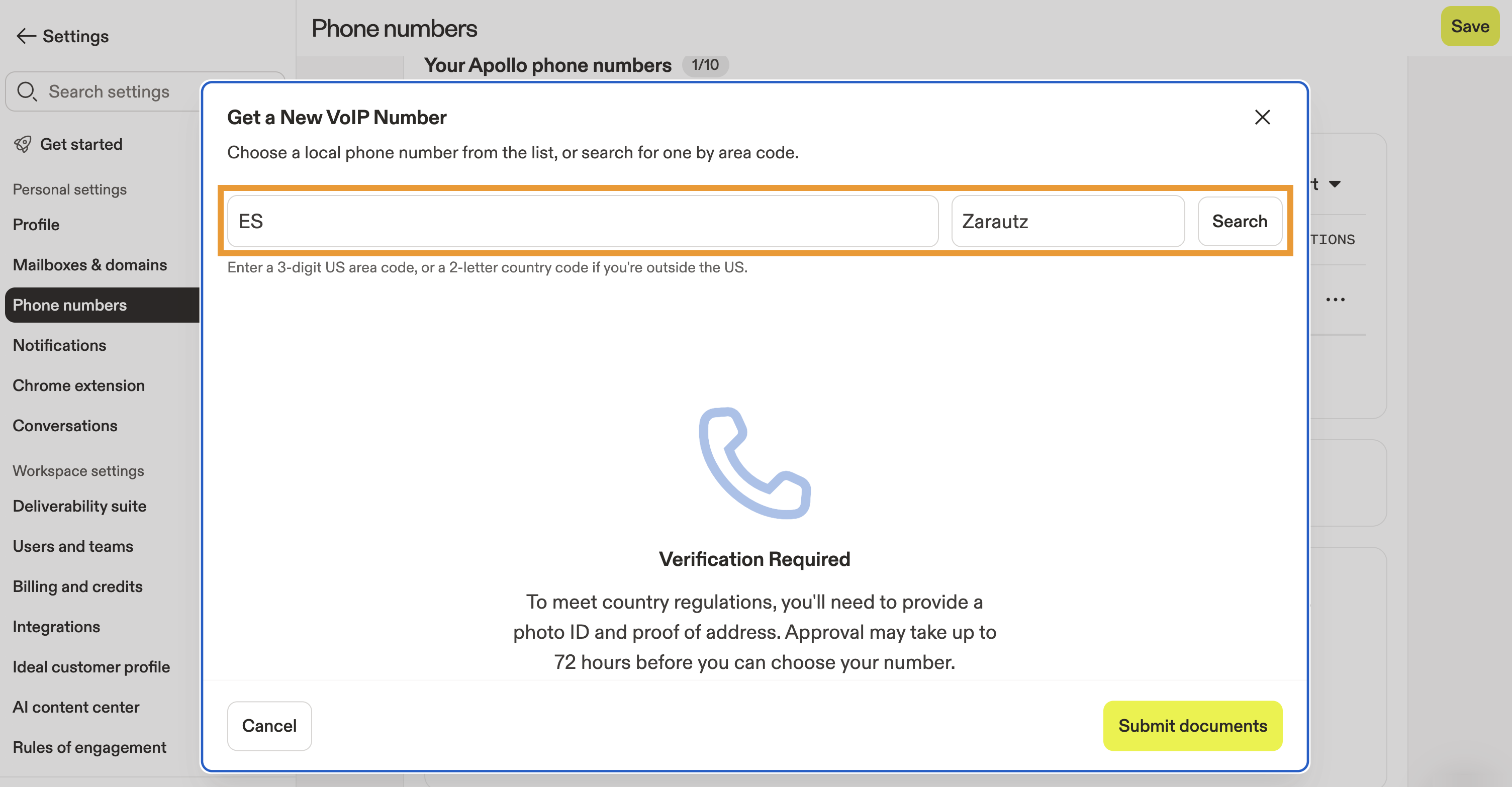
Apollo charges monthly credits for each phone number you purchase. Learn more about getting a phone number on Apollo.
Next Steps
Here are a few next steps you and your team can take to get even more value from Apollo's dialer features.
| Dialer Overview | Start by getting a quick tour of the dialer to understand how calling, recording, and analytics all work together in Apollo so your team hits the ground running. |
|---|---|
| Get an Apollo Phone Number | Next, get an Apollo phone number to unlock calling from within Apollo, and keep every conversation automatically logged. |
| Set Up the Dialer to Make Calls on Apollo | Once you've got numbers ready, set up the dialer to make calls on Apollo to configure outbound, inbound, and recording preferences so calls flow the way your team works. |
| Make and Receive Calls | When everything's configured, make and receive calls directly from Apollo to speed up connect rates, keep notes in one place, and simplify your team's daily workflow. |
| Troubleshoot the Dialer | If something feels off, quickly troubleshoot the dialer to fix common connection or audio issues and keep your reps confidently dialing. |