
Overview
Reliable email deliverability is essential to the success of any outreach campaign. No matter how compelling your messaging or how well-tested your calls to action, it's all wasted effort if your emails don't reach an inbox. Outreach takes time, money, and can quickly exhaust your addressable market, so protecting your return on investment starts with making sure your emails get delivered.
Email warmup improves email deliverability by connecting you to third-party providers that send emails from your mailbox to a private network of inboxes across the world to simulate real email traffic. This integration opens and replies to your emails within this network. Collectively, this behavior signals to mailbox providers that your emails are trusted and increases your email reputation.
Running cold email campaigns without preparing your mailbox can be risky for your sender reputation and deliverability. Use email warmup to ensure your messages consistently reach the right contacts.
Email warmup is available on select Apollo plans. If you need to use email warmup, upgrade your plan. If you have questions about upgrading, reach out to the Apollo sales team.
Check out the following sections to use email warmup.
Use Email Warmup
If your sender reputation is already damaged, email warmup may not be sufficient to recover. You may need a mix of changes, like ensuring your email domain is properly set up and committing to email best practices. Apollo offers an email deliverability checklist and a comprehensive live webinar Email Deliverability 101 so you can learn the fundamentals of deliverability. However, if your sender reputation is beyond repair, it may be time to start fresh with brand new domains or mailboxes and rebuild trust from the ground up.
If needed, you can generate domains and mailboxes right on Apollo — no IT team required.
To get started, first link your mailbox on Apollo. Email warmup only works on mailboxes connected to Apollo.
To use email warmup:
- Launch Apollo and click Settings > Email setup and health.
- Toggle Start warm up beside your mailbox.

- (Recommended) Click Sign in with Google, and review and agree to the terms to continue.

- Alternatively, enter your email address and a third-party app password, then click Check connection.
If your email is hosted on Office 365, ensure SMTP AUTH is enabled in your email app settings. Without SMTP AUTH, Apollo can't run warmup on your mailbox.
If you're not sure how to check or enable this, reach out to your Office 365 admin for assistance.
If you enter an email and password, the password must be a third-party app password, which is different from your email address password. To enable third-party app passwords with Gmail, you must also enable two-factor authentication on Gmail.
Learn more about third-party app passwords on Google Support or Microsoft Support.
- Next, select how you want to warm up your mailbox:
- Progressive: Apollo recommends progressive warmup as it gradually increases email volume over time.
- Flat: Send a consistent email volume that doesn't change over time, which may be useful if your inbox is already warm, and if you want to maintain high deliverability.
- Randomized: Experiment with email warmup. Apollo randomizes the email volume used to warm up your inbox.

- Select a warmup end date. Apollo recommends a minimum two-week time frame for the best results.
- Enter a minimum and maximum number of emails sent per day and a reply rate per day:
-
Minimum: Based on industry best practices, Apollo recommends
10. -
Maximum: Apollo recommends
40. This number can be no more than50. -
Reply rate per day: Apollo recommends
30%. This percentage can be no more than45%.

- When finished, click Warm up mailbox.
You have now enabled email warmup.
Third-party providers send and engage with emails through a trusted network of mailboxes until the scheduled end date, helping build your sender reputation. You can check email warmup status, as well as stop and restart warm up at any time.
Check out some next best steps once you've started email warmup.
Email warmup doesn't use AI-generated emails or messages from your Apollo sequences and templates. Instead, it sends system‑generated test messages between a private network of inboxes to safely build your sender reputation. You can filter these messages from your email folder if needed.
Check Warmup Status
To check email warmup status:
- Launch Apollo and click Settings > Email setup and health.
- Review the warmup status beside your mailbox.

Warm up progress will change over time as warm up increases. You can review other mailbox metrics, as well as check your mailbox health.
If you need to stop email warmup, click ... > Stop warm up. You can restart email warmup at any time.
If deliverability declines during email warmup:
- New mailbox: If your mailbox has little to no prior sending history, continue using email warmup and troubleshoot the dip. If you stop warmup prematurely, it may impact your sender reputation. Review deliverability health when you manage mailboxes and domains on Apollo, verify domain authentication, and follow email deliverability best practices.
- Established mailbox: If your mailbox has significant send history, you typically don't need to pause warmup for minor fluctuations. Verify domain authentication, troubleshoot bounced emails, and reduce outreach volume if needed while warmup continues. If deliverability keeps on declining after a few days, you can pause the warmup while you troubleshoot.
FAQs
|
Frequently asked questions |
||
| How does email warmup work? | Can I send emails while my mailbox is warming up? | How many mailboxes can I enroll in email warmup? |
| Can I choose which sequences to use with email warmup? | Why am I seeing emails I didn't send in my mailbox? | Can I filter out warmup emails in my mailbox? |
| Why did email warmup stop? | ||
How does email warmup work?
Email warmup uses a private network of real inboxes to gradually send, receive, open, and reply to emails on your behalf. This helps build a positive sender reputation and signals to mailbox providers that your emails are safe and trustworthy.
Email warmup is conducted through Warmbox.ai, a third-party provider. Participation is optional and entirely at your discretion. Apollo doesn't control, manage, or take responsibility for any third-party warmup services or their practices.
Can I send emails while my mailbox is warming up?
Allow warmup to finish before sending automated or manual emails in Apollo. Once warmup is finished, you can use your mailbox as normal.
How many mailboxes can I enroll in email warmup?
The number of mailboxes you can enroll depends on your Apollo plan and available credits.
- Paid plans: Paid plans typically include warmup for 1 mailbox per seat. Each additional linked mailbox uses 200 credits per 30-day billing period.
- Free plans: Each linked mailbox uses 200 credits per 30-day billing period.
- Export-credit plans: Each linked mailbox uses 40 export credits per 30-day billing period.
Apollo charges the applicable credits when you start warmup and again at the beginning of each 30-day billing period. If your team doesn't have enough credits when the next cycle is charged, Apollo automatically pauses warmup for the mailbox.
After your team adds more credits, restart warmup from your mailbox settings.
If you enroll multiple mailboxes in warmup at once, your outbound volume may slow.
Can I choose which sequences to use with email warmup?
No. Email warmup uses system-generated test messages sent through a private network of inboxes. It doesn't use emails from your Apollo sequences, templates, or manual sends, so you don't need to choose specific sequences for warmup.
Why am I seeing emails I didn't send in my mailbox?
Email warmup sends actual messages from your mailbox using a private network of test inboxes. Those messages show up in your inbox and sent folder just like any real email so you can track opens and replies to confirm your warmup is running. You can filter out warmup emails to keep your inbox clean.
Can I filter out warmup emails in my mailbox?
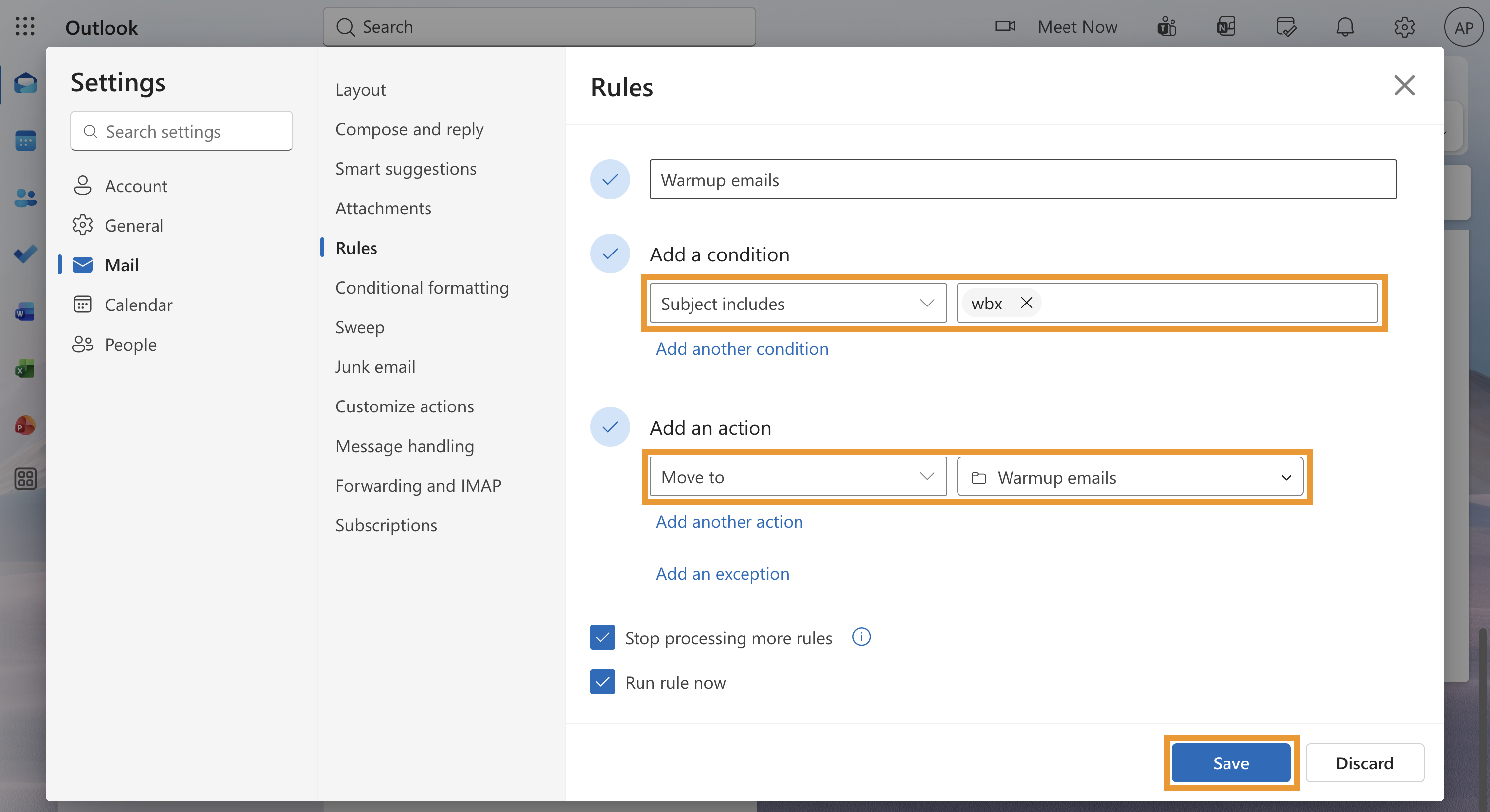
Yes, you can filter out warmup emails in your mailbox to keep your inbox tidy. Apollo recommends filtering warmup emails rather than mass-deleting them or marking them as spam or junk, as this may affect your sender reputation. Preserving warmup messages can also be helpful if Apollo needs to troubleshoot your warmup activity.
To filter out warmup emails:
- Sign in to your mailbox provider.
- Create an inbox filter. Depending on your provider, the steps may differ:
| Gmail |
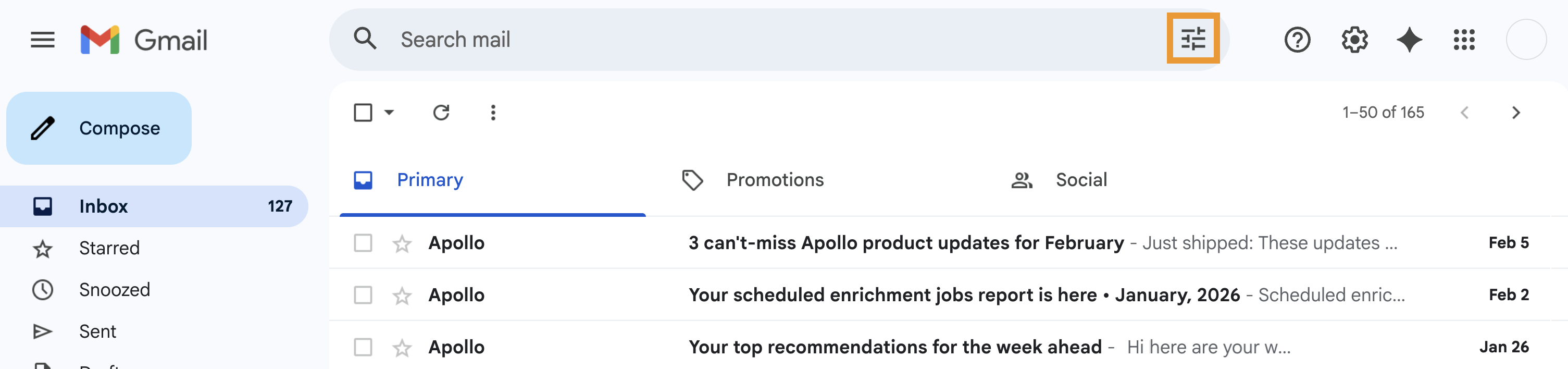


Learn more about creating filter rules on Gmail. |
|---|---|
| Outlook |

|
| Other |
Most mailbox providers support rules or filters that automatically organize incoming emails. To filter warmup emails:
If you're unsure where to find rule settings, check your provider's support center or reach out to them directly for help. |
Why did email warmup stop?
Email warmup may stop if your account or team credit pool runs out. When there aren’t enough credits, Apollo automatically pauses warmup for the mailbox. Apollo pauses warmup rather than canceling it, so your setup and progress aren’t wiped.
After your team adds more credits, restart warmup manually from your mailbox settings. Warmup resumes from where it left off.
OAuth revocation, Gmail password issues, or token issues may also stop warmup from sending until you restore the mailbox connection. These connection issues don’t automatically delete warmup progress. After you fix the connection, warmup can continue unless you manually unlink and relink the mailbox.
If you see Failure: Failed to parse response (Code: 53130) when you start email warmup, Apollo's email warmup provider, Warmbox, likely returned a temporary bad response. Wait 15-30 minutes, then try start warmup again. This error is usually temporary, so warmup may start successfully after a short delay.
If you’re still running into the error, unlink and relink the mailbox in Apollo. If the mailbox email address changes, or if you need to disconnect and reconnect the mailbox, warmup restarts from zero after you relink it.
Next Steps
Once you've started email warmup, check out these next steps:
| Email Deliverability Best Practices | Mailbox providers often have strict rules to protect people from unwanted email. To avoid spam blockers, follow email best practices. If you don't, your emails may bounce and never reach your audience, putting your domain health at risk. |
|---|---|
| Monitor the Deliverability Score of a Connected Mailbox | Keep an eye on your mailbox deliverability score over time to ensure your emails reach your contacts. Apollo's deliverability score clues you into deliverability issues if they occur and provides actionable steps you can take to fix those issues. |
| Email Deliverability 101 | Join this live webinar session to learn the ABCs of linking your mailbox, setting up domains for maximum deliverability, and monitoring the health of your email performance. |
| Use Sample Outbound Email Templates | Staring at a blank page? Use Apollo's sample outbound email templates to spark inspiration and help you craft the perfect message. |
| View and Respond to Emails | Stay connected with prospects through email directly in Apollo, where you can view contextual information from contacts, set up meetings, and take notes as you reach out. |
| Join the Apollo Community! | Ask questions, swap tips, and connect with other Apollo users to grow your knowledge and solve problems faster together. |