
Overview
Your team may use forms on your website to capture information from prospects. With form enrichment on Apollo, you can keep forms short and approachable for higher conversion rates, while automatically enriching submissions with Apollo data. This gives you a more complete picture of who is reaching out to your team.
Form enrichment is platform-agnostic, meaning you can use it with marketing automation forms like Marketo, HubSpot, or ActiveCampaign. Or you can plug form enrichment directly into your website platform through Webflow, Wix, and more.
Form enrichment offers efficiency in two ways. It reduces friction for prospects by limiting the fields they need to complete. For example, when someone enters their name on a form, Apollo may automatically fill or hide fields for the prospect based on your configuration. At the same time, for each form submission, Apollo automatically gives you valuable additional context so you know who you're reaching out to and how best to connect. Any net-new prospects that submit a form are saved as contacts in Apollo so you can track progress and begin outreach.
Apollo has a native, customizable form builder built right into the platform. Check out Use Apollo's Form Builder to Capture and Route Prospects.
You can use the following types of form enrichment on Apollo:
| Phone number enrichment | When someone submits a form, they're saved as contacts and Apollo automatically finds a matching phone number for the prospect so you can begin dialing without looking up numbers. |
|---|---|
| Auto-fill | Apollo fills out known fields for the prospect based on the prospect's email address, saving your prospect time and effort on lengthy forms for which data is already available in Apollo. |
| Hide known fields | Apollo hides auto-filled fields as prospects fill out a form to effectively shorten the form. Enabling this option increases the likelihood that a prospect will submit your form but removes their ability to edit auto-filled answers. |
Check out the following sections to set up and use form enrichment on your website.
Set Up Form Enrichment
When you use form enrichment on Apollo to collect personal data, you act as the data controller, which means you're responsible for complying with applicable data privacy laws like General Data Protection Regulation (GDPR) in the European Union, as well as various U.S. state privacy laws like the California Consumer Privacy Act (CCPA). It's your responsibility to ensure you obtain appropriate consent or have a lawful basis for collecting and processing personal data submitted through any forms you use. You're also responsible for ensuring you have the right to share any data with Apollo.
To set up form enrichment:
- Launch Apollo and click Form enrichment.
- Click Create Form.

- Enter your form name.
- Type the primary domain URL on which your form resides, then click Add domain.

Enter the primary domain including https:// like https://apollo.io. You don't need to enter the full path like https://apollo.io/path/form. You can enter and select multiple website URLs. However, don't use subdomains here.
- Click Next.
- Form enrichment uses credit to save and enrich contacts who fill out your form. Review the credit usage.
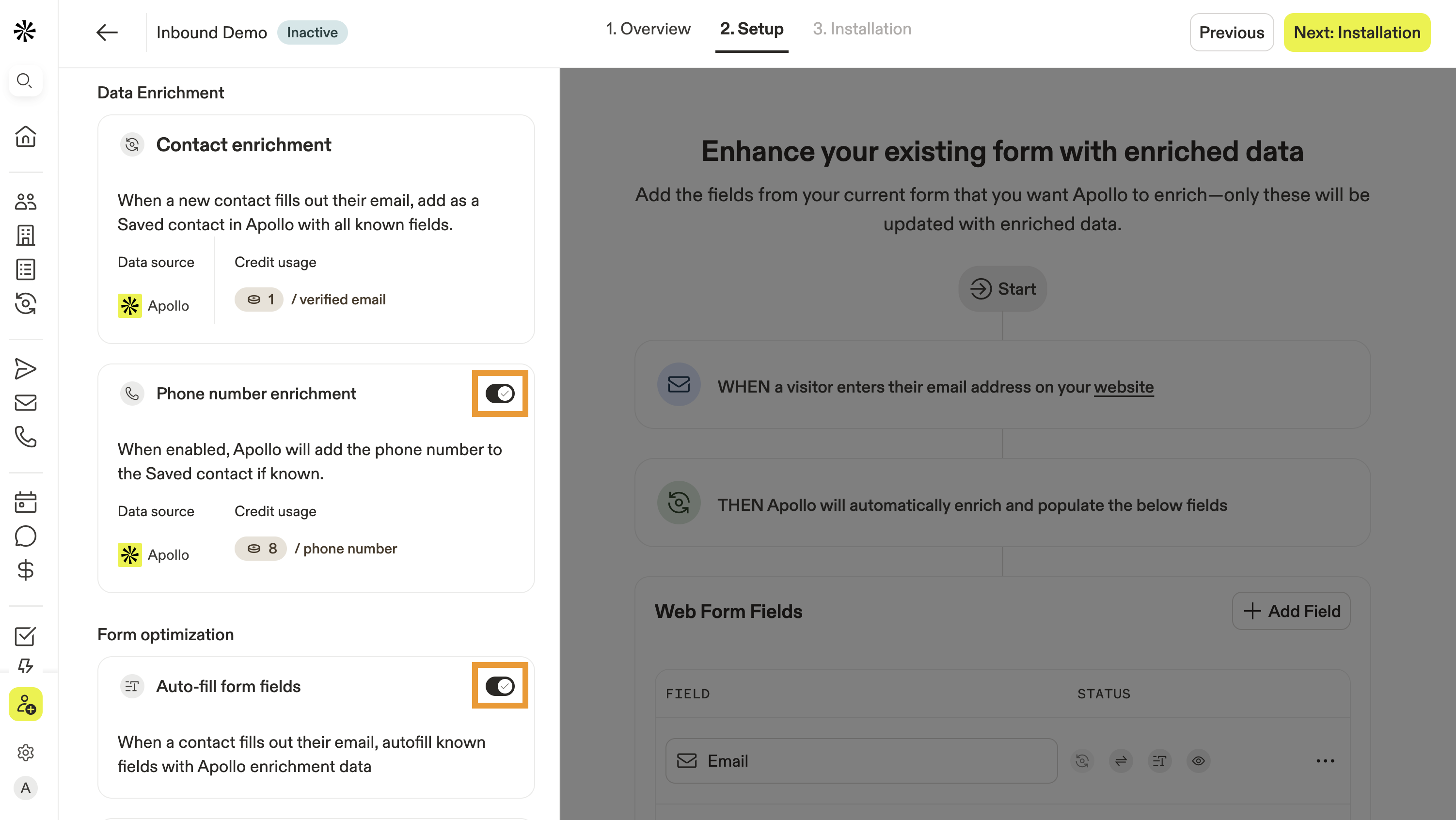
- Toggle on each type of form enrichment you want to use on the form:
Phone number enrichment
If available, Apollo will automatically add a phone number to the saved contact in Apollo.
Auto-fill form fields
When a contact enters their email address on a form, Apollo auto-fills known fields with Apollo data in real-time, saving the prospect time and effort.
Hide known fields
With auto-fill enabled, hide known fields allow you to shorten a form by hiding fields for which Apollo already has data. Only fields not matched with Apollo data will show, saving the prospect time and effort.
Enrich only company emails
As a security measure or to hone in on a specific ideal customer profile, you can restrict your form enrichment to only allow company emails to be enriched instead of personal ones.
Limit credit usage
To avoid depleting your credits, you can limit the number of credits the form uses within your selected timeframe.
Delay contact CRM sync
Apollo delays contact creation by one hour. After this delay, Apollo creates the contact in Apollo, and syncs it to your CRM.
Preserve visitor input
Apollo fills only empty fields, helping preserve visitor-provided data while enriching incomplete fields.
- Next, click Add field to map your form fields to Apollo.

- Enter the form field name, like first name
- Next, select an Apollo field to map to, like First name.
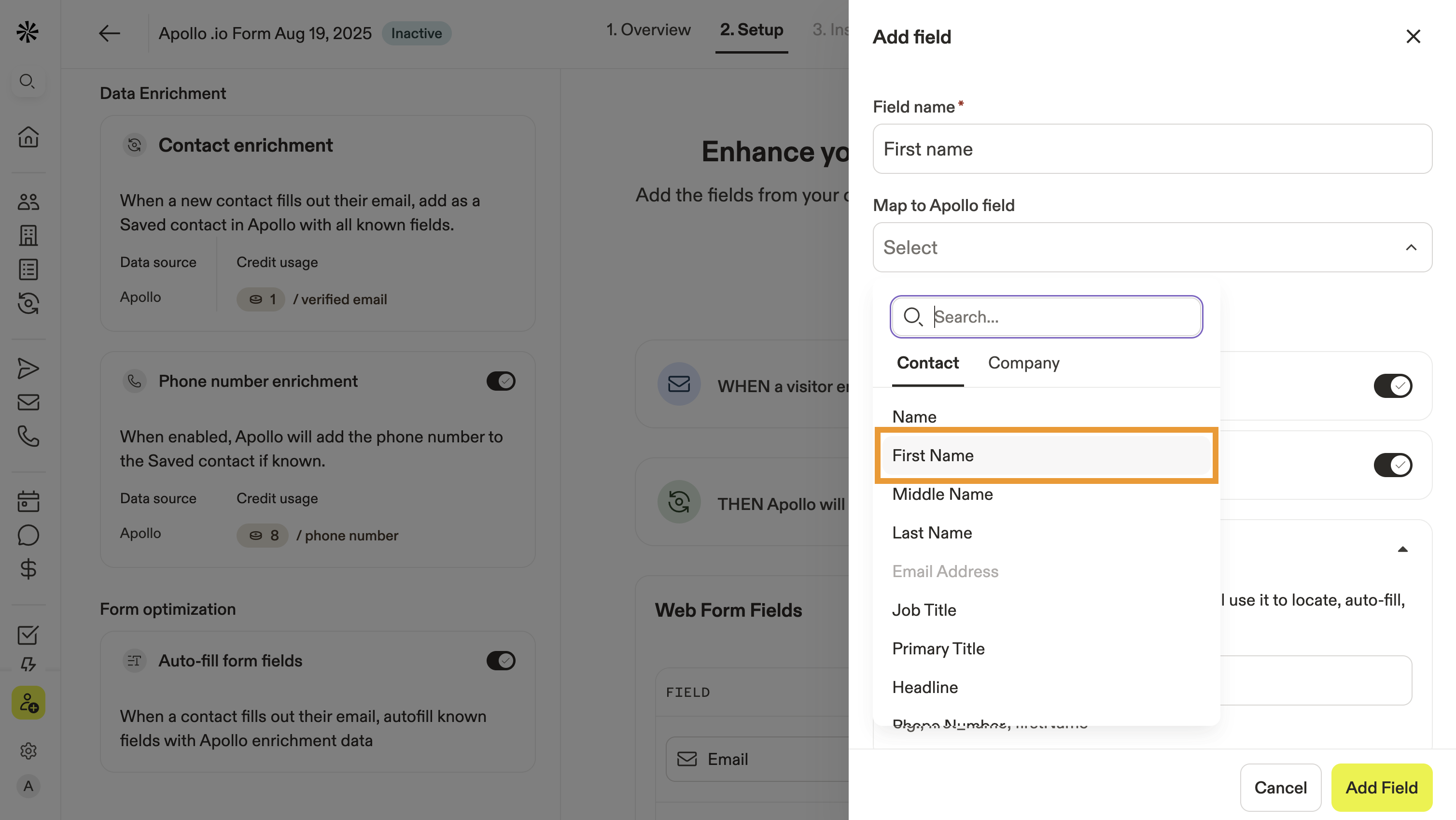
- Enter the field's HTML identifier from your website, like
first_name.
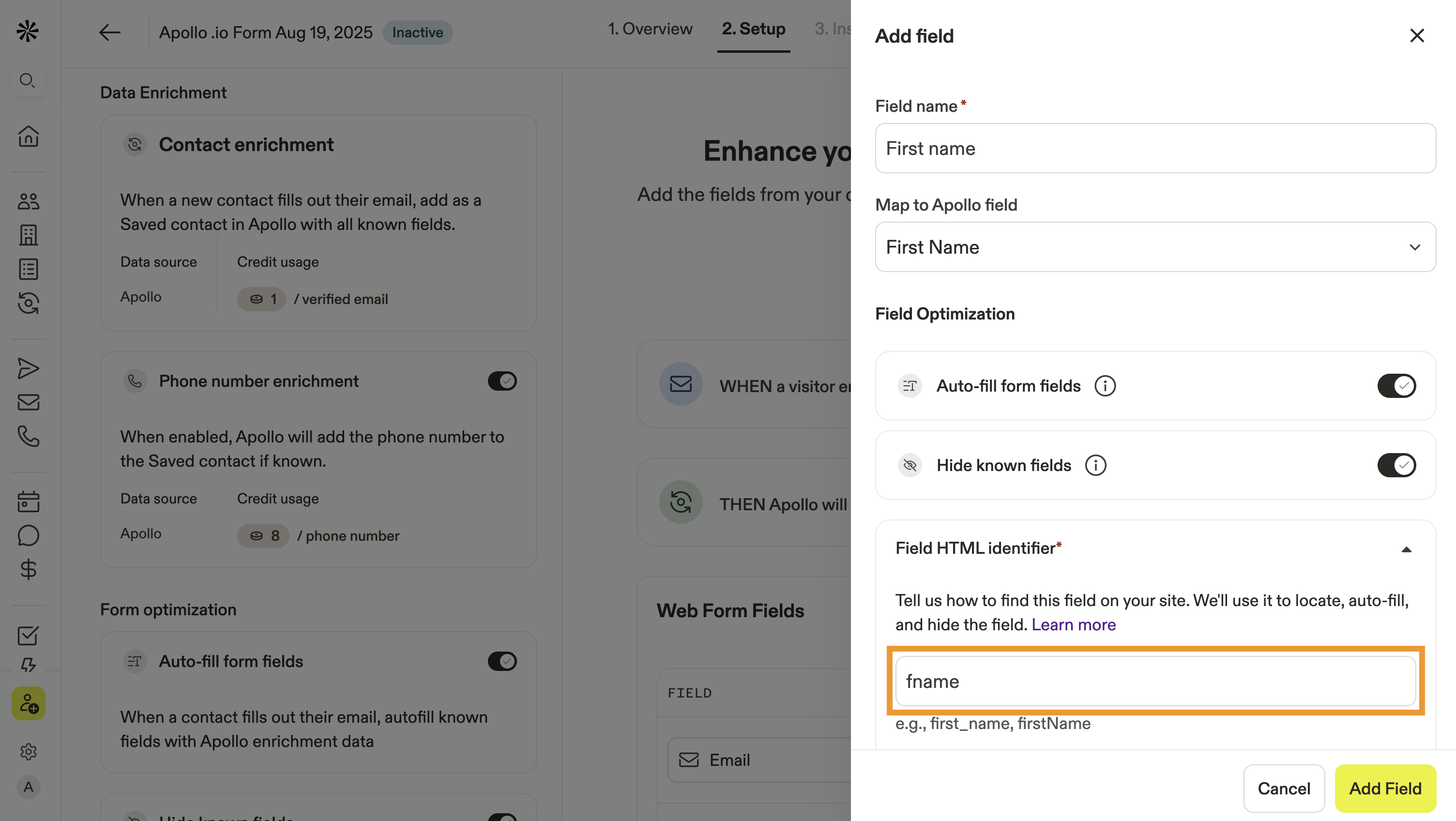
An HTML identifier is a unique label used to identify an element in a web page. You can ask your web dev team for help, or if you're computer savvy, visit your website and right-click the form field element. Then click Inspect. Your browser displays the HTML, which should include a name identifier:
- When finished, click Add field.
- Repeat this process to map additional fields.
- When complete, click Next.

- Copy the Javascript snippet.
- In a separate tab, navigate to your website HTML file or tag manager. Paste the snippet inside the
<head>tag or before the closing</body>tag.
Wondering what an HTML file or tag manager is? Check out these resources from popular web hosting services to learn how to add code snippets. Alternatively, you may need to reach out to your web development team.
- When finished, return to Apollo and click Save.
You have now configured form enrichment on Apollo. When net new prospects respond to your form, Apollo automatically creates a saved contact and enriches their record as you configured.
Did you know? You can use Apollo's inbound router with form enrichment by selecting a standalone intake form. This lets you centralize and reuse form templates across different routers.

You can also use form submissions and abandoned forms as a trigger to start a workflow.

View Contacts Who Responded to a Form
To view contacts who responded to your form:
- Launch Apollo and click Form enrichment.
- Select your form, then click Contacts.
- Apollo displays all the net-new contacts who replied to your form, including their conversion date, enrichments, and credits used.

- (Optional) Use search filters to narrow your results.
- Click a contact to view their contact profile.
You can add contacts to sequences or lists, reach out via phone or email, set up meetings, or create unique tasks to track your outreach.
Check out some more next best steps.
You can optionally configure some advanced settings form enrichment — this isn't required, and it's best to only experiment if you have web developer experience.
(Optional) Advanced Settings
With form enrichment enabled, you can optionally further customize the form submission. These settings aren't required to use form enrichment and should only be explored by teams with web development experience.
The following API method is available to trigger Apollo enrichment and bind to your web forms:
initFormEnrichment(config: FormEnrichmentInitConfig): voidYou must include the appId, which is the Apollo application ID. This can be found within the Javascript snippet generated by Apollo.
The following basic options can also be defined:
formElement |
The form DOM element or selector. |
|---|---|
options.autoDetect |
Defaults to true, which means Apollo auto-detects the first form with an email input. |
onReady() |
Define the callback when the widget is ready. |
onError() |
Define the callback if there's an error, such as a bad configuration. |
Next, you can customize form enrichment with the following options:
| Attach a form dynamically | Detach a form |
| Manually enrich a form | Submit enriched form data |
| Subscribe or unsubscribe from events | |
| Add Apollo router and form enrichment to your website form |
Attach a form dynamically
Use this option to add Apollo enrichment to a web form that appears dynamically on your website, such as a form in a pop-up:
attachForm(target: HTMLFormElement | string): voidDetach a form
Use this option to remove Apollo enrichment from forms that have been removed or no longer need to be enriched:
detachForm(target: HTMLFormElement | string): voidManually enrich a form
Use this option to manually trigger enrichment for a specific form.
enrichForm(email: string, opts?: EnrichOptions): voidexport type EnrichOptions = {
formElement?: HTMLFormElement | string;
onComplete?: () => void;
onError?: (error: unknown) => void;
};formElement isn't defined, the first element on the website is automatically selected.
Submit enriched form data
Use this option to submit enriched form data to Apollo.
submitForm(data: Record, opts?: SubmitOptions): void The data you pass to Apollo should be flat. For example:
{ email: 'a@b.com', name: 'Alice' }
You can also pass the following two functions to trigger callbacks:
export type SubmitOptions = {
  onSuccess?: () => void;
  onError?: (error: unknown) => void;
};
Subscribe or unsubscribe from events
on(event, callback) and off(event, callback)
Use this option to subscribe to Apollo enrichment events:
ApolloInbound.on(eventName, callback)And use this option to unsubscribe from Apollo enrichment events:
ApolloInbound.off(eventName, callback)Both on and off support the following event names:
[APOLLO FORM ENRICHMENT]:ready, [APOLLO FORM ENRICHMENT]:enrichStart, [APOLLO FORM ENRICHMENT]:enrichComplete, [APOLLO FORM ENRICHMENT]:enrichError, [APOLLO FORM ENRICHMENT]:submitSuccess, [APOLLO FORM ENRICHMENT]:submitErrorAdd Apollo router and form enrichment to your website form
Trigger Apollo's inbound router and form enrichment through your website's form submissions
const onSuccess = (response) => {
  if (window.ApolloMeetings) {
    window.ApolloMeetings.submit({
      map: false,
      lead: formData,
      responseId: response?.responseId,
    });
  }
  // Any other steps you want to add
  emitter.emit(EVENTS.SUBMIT_SUCCESS);
  };
const onError = (error) => {
  if (error?.result === 422 && error?.error === 'Free domain blocked') {
    if (window.ApolloMeetings) {
      window.ApolloMeetings.submit({
        map: false,
        lead: data,
      });
    }
  } else {
    console.error('submitForm error', error);
    emitter.emit(EVENTS.SUBMIT_ERROR, error);
  }
  // Any other steps you wants to add
};
const submitOptions = { onSuccess, onError };
// Usage
submitForm(data, submitOptions);Next Steps
Want to keep the momentum going? Here are a few next steps your team can take after setting up form enrichment.
| Enrichment Overview | Get to know enrichment on Apollo. With access to accurate contact and account records, you can reach the right people, book more meetings, and land more deals. |
|---|---|
| Waterfall Enrichment Overview | Explore how to enable sequential, multi-source enrichment so you can automatically pull emails and phone numbers from cascading providers to get more complete, verified contact data. |
| Add Contacts to a Sequence | Quickly add enriched leads to a sequence to start personalized outreach right away. |
| Create and Use a List | Easily organize prospects into targeted lists to focus your campaigns and boost conversion rates. |
| Dialer Overview | Use the dialer to call prospects directly from Apollo and connect faster with decision-makers. You can even dial like a pro with parallel dialing! |
| Meetings Overview | Seamlessly book and manage meetings with enriched leads to keep conversations moving forward with context. |