
Release Notes
Check out the following sections to discover the latest feature releases, improvements, and updates from Apollo.
September 2026
Product Highlight: Agents on the AI Assistant
Agents proactively handle recurring work for you. Agents on Apollo can help you run outbound without you needing to start from a new prompt each time. Set an agent to run on a daily, weekly, or monthly schedule, then review its results and the recommended next steps in the AI assistant.
Here are the agents you can use:
- Lead discovery: Find prospects that match your ideal customer profile, score them against your criteria, and surface the strongest matches.
- Sequence creation: Get recommended outbound strategies based on your company context, target buyers, and intent signals, then build the sequence with Apollo.
- Sequence optimization: Monitor active sequences for engagement, bounce, and spam signals, then review recommended improvements before Apollo makes a change.
Get started with agents on the AI assistant.
Apollo on Slack
You can now use Apollo directly in Slack with natural language to prospect, research, and take action without switching tools. Ask Apollo to find and enrich people or companies, refine searches, add contacts to lists or sequences, export data, and answer questions about your Apollo data and sequence performance.
- Continue work in Slack: Start a conversation with Apollo in Slack, review results in the thread, and refine your request or take the next step.
- Agent recommendations: Receive scheduled agent results in Slack, review Apollo's recommendation, and approve the next action from the same thread.
- AI assistant notifications: Choose whether Apollo notifies you in Slack when scheduled agent runs or long-running tasks complete, need approval, or encounter a blocker.
Learn more about the Slack integration.
Changes to DNC Screening in France
France has moved from an opt-out to an opt-in model for commercial calls to consumers, and the French DNC registry has been discontinued. As a result, Apollo no longer screens French phone numbers against DNC nor displays a DNC tag for contacts in France.
- French phone DNC screening has been deactivated across Apollo: A French number without a DNC flag does not indicate that it's approved for commercial calling. New and saved French phone numbers on Apollo aren't screened against any DNC registry.
- Customer-managed consent: Apollo doesn't collect, store, or track the validity of consent for calls to consumers in France. You're responsible for obtaining and documenting consent where it's required.
- Calling controls: Apollo doesn't automatically enforce France's permitted calling hours or calling-frequency limits. Keep your own controls in place and honor opt-out requests across your organization.
The new consent requirements apply to consumer prospecting. Continue to follow applicable GDPR requirements for B2B outreach, use extra caution with sole traders and personal mobile numbers, and consult your legal counsel about your France calling practices.
Learn more about protecting your caller reputation and staying compliant.
Catch-All Domain Protection
Catch-all domain protection is now enabled by default for all teams to help protect sender reputation and reduce avoidable bounces. Apollo blocks risky catch-all contacts from manual sends and sequences, while giving admins control to manage the setting and allow trusted domains.
- Two-stage protection: Contacts are checked during enrollment and again before sending from an in-flight sequence.
- Clear visibility: Apollo explains when an email is blocked so reps can understand what happened.
Learn more about email sending policies like catch-all protection.
View as a Permission Profile
Admin can now preview Apollo using a selected permission profile to understand exactly what a rep can see and do. The preview applies across Apollo, shows you a status banner while active, and doesn't actually change anyone's access.
- Apollo-wide preview: Review the entire experience to see what your reps see.
- Admin-only and safe: The preview changes what's displayed, not the permissions or data you can access with your admin account.
Learn how to view Apollo with a user permission profile.
AI Assistant Enhancements
The AI assistant can now turn your existing prospect information into actionable records. Import a CSV of prospects, leads, accounts, or contacts, or paste a list directly into the assistant to start prospecting.
- CSV imports: Upload a CSV and let the assistant verify that it's ready for prospect import before continuing.
- Pasted lists: Convert structured or unstructured prospect lists into prospect records with the assistant.
- Google Maps prospecting: Use the assistant to find local businesses with Google Maps for hyper-local searches.
Learn more about the AI assistant on Apollo.
Apollo MCP Enhancements
Apollo MCP improved its ChatGPT, Claude, and Replit experiences with a more scalable architecture and new growth workflows.
- ChatGPT: Apollo MCP now uses an architecture that dynamically selects the right Apollo capability for your request. This makes it easier for ChatGPT to find the right action as Apollo adds more tools, without requiring you to reapprove new permissions for each MCP update. | Connect Apollo to ChatGPT to get started.
- Claude: Apollo is now a featured connector in Claude for Small Business. Use Apollo across nine Claude business workflows, including ranked lead lists with enriched firmographics, personalized outreach, inbound lead triage, proposal research, call-list creation, and full pipeline workflows that log activity to your CRM. | Connect Apollo to Claude to get started, then install the Claude for small business plug-in.
- Replit: Apollo is now part of Replit's growth skills, helping you go from building an app to actually finding and reaching your first customers. You can launch an outbound motion from Replit with the cold email skill which helps define your ICP, find prospects, and build initial outreach. Or use the pixel + web intent skill to add Apollo visitor tracking and turn your website visitors into actionable prospects. | Connect Apollo to Replit to get started, then use growth skills to build.
Learn more about Apollo MCP.
Apollo API Enhancements
Apollo API added a changelog and now provides clearer, more actionable error responses so developers can identify and resolve issues faster.
- Stable error codes: Identify errors consistently across API requests.
- Actionable suggestions: Guidance in the response helps explain how to resolve an error.
- Changelog: Stay up to date with releases and API changes in the new Apollo API changelog.
Learn more about Apollo API.
ZIP Code Optimization
You can now find more accounts and contacts by ZIP code. Apollo recovers valid postal codes from address data when an address includes a ZIP code that was not previously stored, improving the completeness of ZIP code search and filtering.
- More complete ZIP code filters: Search results can now include US records that previously had a ZIP code in their address but not in the searchable postal code field.
- Validated updates only: Apollo adds a ZIP code to a record only when it matches the city in the address.
Learn more about using the location filter to find prospects.
August 2026
Product Highlight: Custom Objects Sync from Salesforce
Your Salesforce account holds useful details that Apollo couldn't see before, like who attended your last webinar. Custom objects sync brings that data into Apollo (read-only), so reps can use that data to sharpen segmentation, targeting, and prospecting.
- Admin permission required for setup: Choose the Salesforce data you want to pull into Apollo, match up the fields, and confirm how it connects to your contacts and accounts.
- Reps search on it directly: Find people using that data, such as everyone who attended a particular webinar.
- It stays current: Apollo refreshes the data from Salesforce every 15 minutes. Salesforce remains the source of truth.
Custom objects are available to organization plan customers connected to Salesforce. Learn more about creating and syncing custom objects from Salesforce.
Share a Form with a Link
Forms built in Apollo can now be shared using an Apollo-hosted URL, so you no longer need to embed every form on a website. You can send people directly to an Apollo-hosted form page to collect submissions that then flow into Apollo, where records can be enriched automatically and trigger workflows.
Learn more about form builder.
Apollo in Superhuman Go
Apollo now works inside Superhuman Go, Superhuman's AI assistant. As you write an email or review an account, you can look up Apollo data and save updates without opening a new tab.
- Company and contact details where you're already working: See Apollo data inside Superhuman Go instead of switching tabs to look someone up.
- Ask questions and make updates in place: Get answers about an account and send changes back to Apollo without leaving what you are doing.
Find the Apollo connector in the Superhuman connector store.
Waterfall: Scheduled Email Enrichment
Apollo can now fill in missing email addresses for your saved contacts automatically, on a schedule. Two changes help it find more of them.
- More sources checked: When Apollo's own data doesn't include someone's email, scheduled enrichment now continues to additional data providers instead of stopping there. This is called waterfall enrichment.
- More contacts qualify: Whether a contact qualified used to depend on the person record behind it already having an email, which ruled out most of the contacts that needed one. Now any saved contact missing an email qualifies, apart from contacts flagged with a job change.
Set up scheduled enrichment in the data health center.
New Filter: Parent Company Using Apollo Data
The parent account filter only reflected the parent company recorded in your own CRM, so any corporate relationship your CRM had not captured was invisible. You can now filter by the parent company Apollo has identified.
- Filter on Apollo data: Include or exclude parent companies in people and companies search using Apollo's own parent company data.
- See it on the company: A new parent company field shows the parent company Apollo found, if applicable.
- Jump straight to subsidiaries: The subsidiary count on a company is now a link that opens the full list of those companies.
- Know which source you're seeing: Your existing CRM-based filter and field are now labeled "(Your data)."
Learn more about the parent company filter on Apollo.
Salesforce Integration: Faster Syncs With Parallel Pull-All
A full sync from Salesforce used to work through one record type at a time, so the largest accounts could wait days for it to finish. Apollo now syncs record types at the same time. Even multi-million-record pulls finish within a single day, and most large syncs finish in hours.
- Contacts, leads, and accounts together: All three now sync at the same time instead of one after another.
- How much faster: Accounts sync up to 26.7x faster, leads up to 15.8x faster, and contacts up to 9.5x faster.
- On by default: Available to all free and paid teams. Nothing to enable or configure.
Learn more about Salesforce pull settings.
Dialer AI Noise Removal
Background noise on a call, whether keyboard clicks, office chatter, or street sounds, pulls a prospect's attention away from what you're saying. The dialer now includes AI noise removal, which filters noise out of your audio so the conversation stays focused.
- Turn it on from the call: A noise removal toggle is available during any active call.
- Set it once: Noise removal is on by default; your preference carries over to your next call.
- Works on every call type: Available in the parallel dialer, on conference calls, and on incoming calls.
Learn more about making and receiving calls on Apollo.
Italian Language Support
Ciao! Apollo is now available in Italian for all users, joining Spanish, Portuguese, and French as supported languages. Switch your language in your account settings to use Apollo in Italian.
Learn how to choose your preferred language on Apollo.
July 2026
Product Highlight: Form Builder
Build fully customized forms directly in Apollo and publish them to your website without needing a separate form tool. Every submission is automatically enriched and routed through Apollo, so teams get clean, complete prospect data instead of raw form responses that need cleanup.
Pair it with the Form submitted trigger to enroll form submitters to workflows to automatically add them to lists, create follow-up tasks, book a meeting, or notify reps in Slack, among a few workflow automations.
Learn how to use form builder to capture and route prospects.
Sequences: High Bounce Auto-Pause
Admin can now configure auto-pause thresholds for sequences, so risky bounce rates get flagged and paused before they hurt sender reputation. Use the health tab to review the issue, complete recommended cleanup actions, and safely resume the sequence.
Learn more about monitoring sequence health.
AI Assistant Enhancements
The AI assistant on Apollo now handles more complex tasks across prospecting, enrichment, sequences, workflows, and performance analysis. It interprets broader goals, chains together multiple Apollo capabilities, and delivers results or recommended actions right in the conversation, including multi-step workflows, visual summaries and reports, deeper contact and account analysis, parallel execution on larger tasks, and drafting and sending one-off emails.
- AI Assistant on Slack: Workflow notifications and AI assistant are now accessible through a single the Slack integration, so teams no longer need to install and authorize separate apps for each. Teams on the legacy AI assistant Slack app can keep using it during the migration; existing teams need to reconnect the Apollo Slack app before the assistant becomes active in the unified app.
- Sequence Optimization with the AI Assistant: Ask the assistant to diagnose a sequence and recommend one focused improvement. It reviews open, reply, and interested rates to find the biggest bottleneck, then suggests updated subject lines, CTAs, messaging, or targeting. Review a before-and-after comparison before approving. The assistant won't change the sequence without approval.
- AI Assistant Memory: The assistant now retains context across conversations, so you don't have to repeat preferences, decisions, or prior instructions. Ask it to remember something directly, or let it flag useful context on its own. Sequence optimization also draws on memory for more informed follow-up recommendations.
Apollo MCP Enhancements
Apollo MCP now reaches further, with new editor integrations and more flexible sequence personalization. Connect Apollo to Cursor or Replit to build GTM tools with live Apollo data, and use per-contact personalization to combine individualized outreach with sequence automation.
- Apollo is now available on Cursor: Connect Apollo to Cursor to search and enrich prospects, manage records and outreach, analyze performance, and build Apollo-powered apps and tools from your code editor. Currently in beta. Learn how to integrate Apollo with Cursor.
- Build with Apollo on Replit: Connect Apollo to Replit to build apps, dashboards, and GTM tools with Replit Agent using live Apollo data. Currently in beta; requires Replit Core or higher. Learn how to integrate Apollo with Replit.
- Personalized Sequence Emails: Apollo MCP can now write individualized email content per contact while keeping full sequence automation. Cadence, follow-ups, tracking, and auto-pause all still apply, and content is stored in a custom field before enrollment. Apollo pulls it in automatically when the sequence runs.
Apollo API Enhancements
Get the complete hierarchy view right from the API: organization enrichment and bulk organization enrichment responses now include parent, ownership-chain, and subsidiary data, giving teams a more complete view of company hierarchies without the need to combine information from multiple sources.
These endpoints now return fields such as the ultimate parent organization, ownership chain, direct owner, number of subsidiaries, and hierarchy rollups. The single-organization endpoint also returns subsidiaries with firmographics, while the bulk endpoint includes parent-level rollups.
CRM Integration Enhancements
Apollo expanded its CRM integrations and capabilities so teams can sync records and take action from the tools they already use.
- Zoho CRM and Microsoft Dynamics: Sync contacts and accounts bidirectionally and push records through workflows.
- Salesforce and HubSpot bulk actions: Use the Apollo Chrome Extension to save records, add them to lists or sequences, compose emails, push to CRM, or export company data.
- Preserve user attribution with the Salesforce integration: You can now map Apollo's
created_byfield to SalesforceCreatedByIdso new contacts, leads, accounts, and opportunities created through Apollo show the Apollo user who created the record, rather than the connected Salesforce or sync user. Learn how to map created by attribution.
Waterfall Enrichment Enhancements
Admin can now manage email and phone waterfall enrichment from data management settings. You can configure the waterfall provider order in one place instead of individual search columns or field settings. All users can view the page, but only admins can edit it.
Learn more about using waterfall enrichment.
Business Name on Caller ID
You can now add a caller ID name (CNAM) to US phone numbers on Apollo so supported recipients can see your business name when you call. An approved business profile is required, and caller ID display varies by carrier and device. Learn how to configure caller ID when you get a phone number on Apollo.
Review Email Tracking Requirements for France and Italy
Apollo's email-tracking guidance now highlights 2026 regulatory guidelines from France and Italy. Teams marketing to residents of either country should review whether prior consent is required for open and click tracking and use Apollo's GDPR settings to prohibit tracking for EU recipients when necessary.
Learn more about configuring GDPR settings.
Credit Usage Enhancements
The redesigned credit usage experience helps admins understand which users, features, and actions are driving consumption, making it easier to investigate unexpected usage and manage available credits. You can now review visualizations showing usage by feature set and user.
These updates are available to all Apollo users. Some reporting and team-member filters require admin access.
Learn how to review credit usage.
June 2026
Product Highlight: 200+ Integrations in Workflows
Apollo Workflows now connects to 200+ apps, so your data can flow automatically from Apollo into the tools your team already works in. Instead of manually exporting lists and updating other platforms, you can build workflows that push data directly to your stack the moment a trigger fires, keeping your marketing tools, analytics platforms, and data warehouse in sync with Apollo automatically.
Some popular integrations include:
- Google Sheets: Export contact or account data to an existing spreadsheet.
- Airtable: Create new records in a table.
- Klaviyo: Create or update a contact profile.
- Mailchimp: Bulk add contacts to an audience.
- Snowflake: Execute SQL queries, or insert single and multiple rows into a table.
- Amplitude: Track custom user events and send them directly to Amplitude.
Get started with workflows and check out the list of Apollo's available workflow integrations.
Apollo MCP Enhancements
Apollo MCP received a major expansion in June, giving users in Claude, ChatGPT, and other MCP-compatible tools the ability to do significantly more inside Apollo with less manual hand-holding.
- Task management: AI tools can now read and work your Apollo task queue end-to-end. Agents can search open tasks by type, priority, or sequence, view full task context, complete or skip tasks with a note, create single or bulk follow-up tasks, and reschedule, reprioritize, retitle, annotate, or reassign existing tasks through natural language prompts.
- Custom field read and write: AI tools can now discover your team's custom fields and read or write values across contacts and accounts, including text, number, picklist, boolean, date, and structured JSON types. This enables AI-driven lead qualification workflows where agents research contacts, score them, and write results directly into custom fields for use as sequence enrollment criteria.
- Expanded search filters: MCP search now exposes more Apollo UI filters for agents, including founded year, SIC and NAICS codes, and market segment, among others. Agents can now run precise searches like "fintech SaaS companies founded after 2015" without silently dropping filters.
- Sender mailbox guardrails for sequence enrollment: When enrolling contacts into sequences via MCP, agents now surface all available mailboxes and require explicit selection when multiple mailboxes are connected. Single-mailbox setups remain frictionless.
- One-off email: AI tools can now compose and send individual emails through MCP. The workflow is split into two deliberate steps, draft then send, so nothing goes out by accident. This update also includes support for arbitrary to, cc, and bcc recipients, a one-step confirmed send option, and a new tool to check email delivery status.
Learn more about Apollo MCP.
Snowflake Data Share
Enterprise customers can now query their Apollo data directly from their own Snowflake instance, with no need for exports, ETL pipelines, or data copies. Apollo exposes 16 tables via Snowflake Secure Data Sharing, including contacts, accounts, sequences, emails, calls, tasks, deals, activity logs, and an ID-mapping table so customers can join Apollo records to their own CRM data.
Setup is self-serve: enter your Snowflake account ID in Apollo's settings, and Apollo provisions a private share. Data refreshes weekly.
Learn more about the Snowflake integration.
CRM Sync Enhancements
Apollo has extended its CRM sync visibility features to cover the push direction (Apollo to CRM) and added a live progress indicator for pull syncs, giving teams visibility across both directions of CRM sync.
- Push Queue Activity: A time-series chart of records pending push to your CRM over a selected period.
- Push Sync History: A log of recent push sync runs — completed, in progress, and failed — with record counts, duration, and error messages for failed runs.
- Pull Progress percentage: A live progress bar on active pull syncs so you can see how far along a sync is.
These features are fully rolled out to all teams using Salesforce and HubSpot CRM integrations.
Apollo has also shipped new CRM field-mapping improvements so you can sync more Apollo data into your CRM and tie CRM records back to their Apollo source. This is available for customers syncing Apollo data to Salesforce, HubSpot, Pipedrive, Zoho, and MS Dynamics. You can map the following fields:
- Department, sub-department, and seniority: Map these Apollo fields to native or custom CRM fields.
- Apollo record ID: Apollo's record ID is now exposed across CRM integrations and CSV exports, so you can store it in your CRM for deduping and easier reference.
Bounce Logs in Deliverability Suite
A new bounce logs view in the deliverability suite's settings gives paid teams a dedicated place to track and remediate bounce activity across mailboxes, recipients, sequences, and domains.
This includes:
- High-level bounce metrics and activity charts over time.
- A searchable, filterable log of bounce events with context including recipient, mailbox, sequence, bounce category, bounce reason, and SMTP details.
- A remove-from-sequences flow directly from the bounce log.
Learn more about the deliverability suite.
Website Visitors Enhancements
Apollo's website visitors received several improvements to help you activate faster and get more out of identified website visitors:
- Default recency sort: Company and people visitor views now sort by last visit date by default, and a timestamp on the Last Visit Date column shows the exact date and time of each visit.
- Visitor analytics widgets: New widgets at the top of both views show how many visitors were identified and how many the account has engaged with, plus a usage breakdown graph for company and people identification.
- Workflows tab: A new Workflows tab surfaces preset website visitor workflow templates and filtered workflows using visitor triggers, making it easier to automate next steps once a visitor is identified.
- New attribution columns: New columns on the people visitors tab surface referral source, referrer domain, and UTM campaign data to show how visitors reached your website.
Learn more about tracking website visitors.
Apollo API Updates
Apollo added new endpoints:
- One-off email endpoints: A new set of one-off email endpoints, including the ability to create an email draft, send an email immediately, and check email send status.
- People API endpoint: Apollo added a new People API endpoint, enabling the ability to get complete person info in a call.
Developer Doc Enhancements
Apollo's developer documentation received several upgrades to make it easier for developers and AI tools to build on the Apollo API:
- Credit usage visibility: Apollo updated the developer docs to make credit usage clearer before developers test or scale API workflows. The new API Pricing and Credits guide explains how credit usage works, which endpoints may consume credits, when usage is conditional, how pagination or repeated requests can affect usage, and how to estimate and review credit usage. Endpoint reference pages now include credit usage callouts for faster decision-making.
- Ask AI: Ask any question about the Apollo API and get an instant answer directly on the docs site.
- Public OpenAPI spec: The full API is now available as a machine-readable OpenAPI JSON file, making it easier to import into Postman, generate typed SDKs, or use with LLM-based tooling.
Learn more about the Apollo developer docs and OpenAPI spec.
Intent Data: Upgrade from LeadSift to Bombora
Apollo's intent signals are now powered by Bombora. Existing LeadSift intent topics have been automatically mapped to their Bombora equivalents.
Intent-based filters, alerts, and scoring in Apollo are now working with current buyer activity data.
Learn more about intent signals in Apollo.
May 2026
Product Highlight: Apollo on Perplexity
You can now connect Apollo to Perplexity, allowing you to run core GTM workflows without leaving the conversation.
Use Apollo on Perplexity to search for prospects, enrich people and companies, create or update records, create sequences and enroll contacts, and analyze team performance using natural language. Apollo remains your system of record while Perplexity becomes a new workspace for research, execution, and action.
Connect the Perplexity integration and go from idea to outcome without switching tools.
Apollo MCP Enhancements
Apollo MCP now includes guided workflows and safer experiences for high-impact actions across AI tools like Claude, ChatGPT, and Perplexity:
- A new sequence skill helps you generate sequences from a prompt, ICP, or company context. You can edit and improve sequence steps, create personalized variants for specific segments or personas, and preview changes before anything is activated in Apollo.
- Apollo also added guidance for risky actions like sequence enrollment, bulk enrichment, and bulk list updates. Before you confirm, Apollo shows key details like the sender, sequence, record count, status, and any applicable credit warnings.
These updates help teams move faster with MCP while keeping important actions intentional, reviewable, and easier to control.
Learn how to use Apollo with your favorite AI tools.
Apollo CLI
Apollo CLI (command line interface) brings prospecting, enrichment, automation, and analytics capabilities to the command line.
Technical teams can now search and enrich records, manage contacts and sequences, pull performance data, and export results in multiple formats, making it easier to build repeatable workflows and integrate Apollo into existing tools and processes.
Learn more about Apollo CLI.
Apollo on Codex
Apollo now works with Codex, OpenAI's autonomous coding agent, bringing Apollo data and actions into engineering and terminal-based workflows. Developers can use Apollo to power scripts, automations, data pipelines, and custom tooling while working directly from a repository-aware environment. Just add Apollo as a plug-in, and you're ready to go. This makes it easier to build agentic workflows that connect prospecting, enrichment, analytics, and automation with the tools your team already uses.
Learn how to add Apollo to Codex.
AI Assistant Enhancements
The AI assistant on Apollo just got better. Incoming updates include:
- Admin on Apollo can now review, edit, approve, and generate content for the AI context center directly from the AI assistant. This makes it faster and easier to confirm company details like your customer profile and products and services before Apollo uses them to personalize AI-generated results. Just ask the assistant to help you complete the context center, and get work done faster.
- You can now use the AI assistant to create and customize prospecting views on Apollo. Ask the assistant to reorder columns, sort results, add or remove fields, or build a new view, helping you quickly organize search results around the information that matters most.
French Language Support
Bonjour tout le monde! Apollo is now available in French, helping teams work in their preferred language across Apollo.
Learn how to choose your preferred language on Apollo.
Import Gong Calls to Apollo
Starting to use Apollo Conversations? You can now pull your historical Gong call recordings directly into Apollo so you don't lose access to the calls that matter. Bring in past recordings alongside future ones, keep your existing Gong workflows intact, and let AI summaries work across your full call history. Import your Gong calls to get started.
Removal Requests and Compliance on Apollo
Stay compliant with removal requests on Apollo. Admin can now review a rolling 30-day list of saved contacts who later requested removal from the Apollo database. Export the list as a CSV, and use it to remove matching records from your saved records, CRM, enrichment, API, MCP, AI, and other downstream workflows when there is no independent legal basis to retain them.
April 2026
Product Highlight: Contact-level Website Visitors
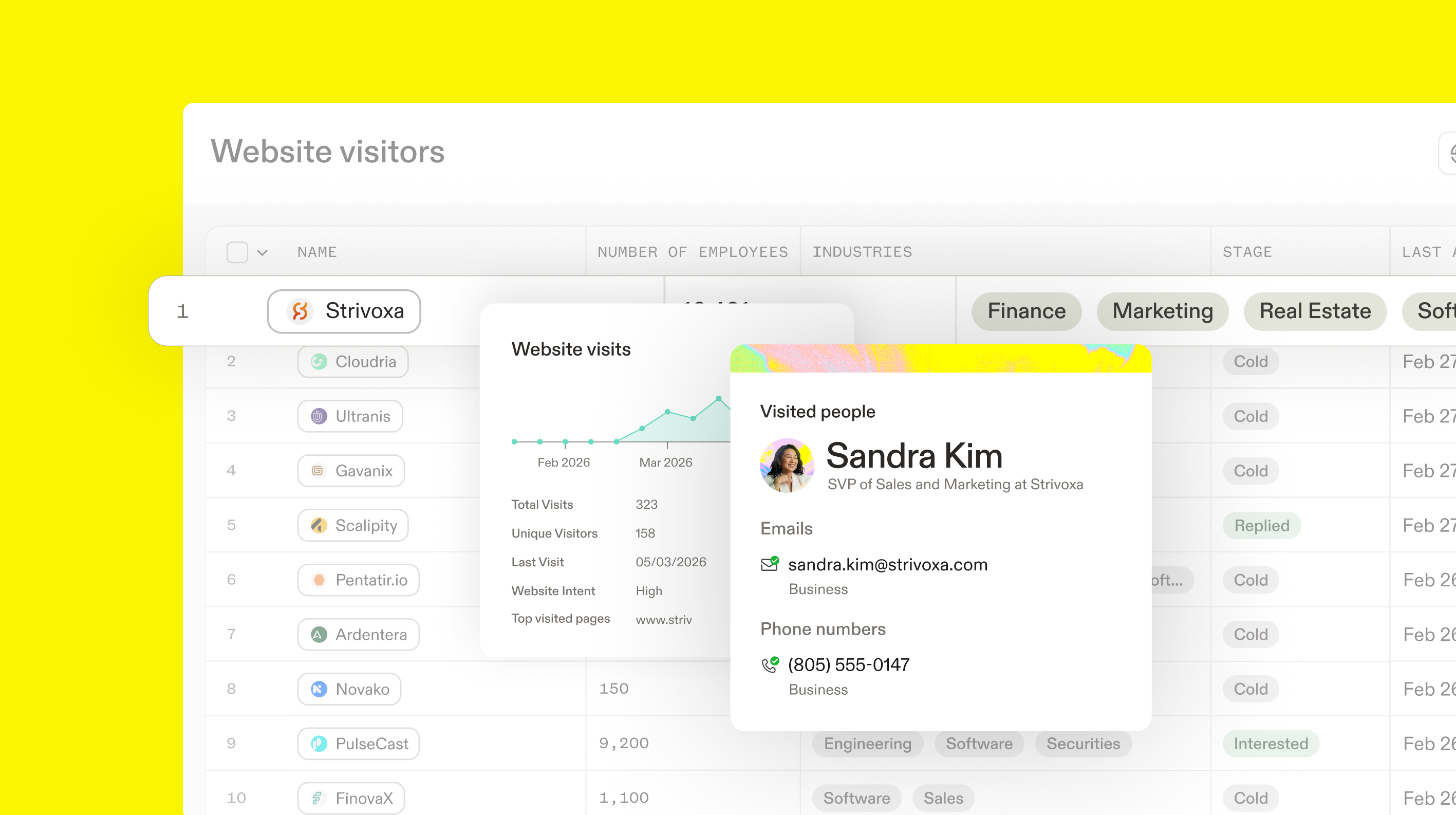
Knowing which companies visit your site is just the start. Apollo now lets you go a step further with contact-level website visitor identification, so you can see exactly who is browsing your pages without waiting for them to fill out a form or convert.
De-anonymize your site traffic and reveal the individuals engaging with your content. See what they're viewing, how often they're visiting, and use that first-party signal to act when intent is high. Plus, you can combine contact-level visitors with the rest of your Apollo workflow, including:
- Triggering automations when someone lands on a key page
- Alerting your sales team the moment a high-value contact shows up
- Enrolling visitors directly into sequences
- Enriching contact profiles with 65+ data points, verified emails, and phone numbers
Contact-level website visitors is only available with the Inbound Add-On and currently supports US-based visitors.
Learn more about contact-level website visitors.
Apollo on ChatGPT
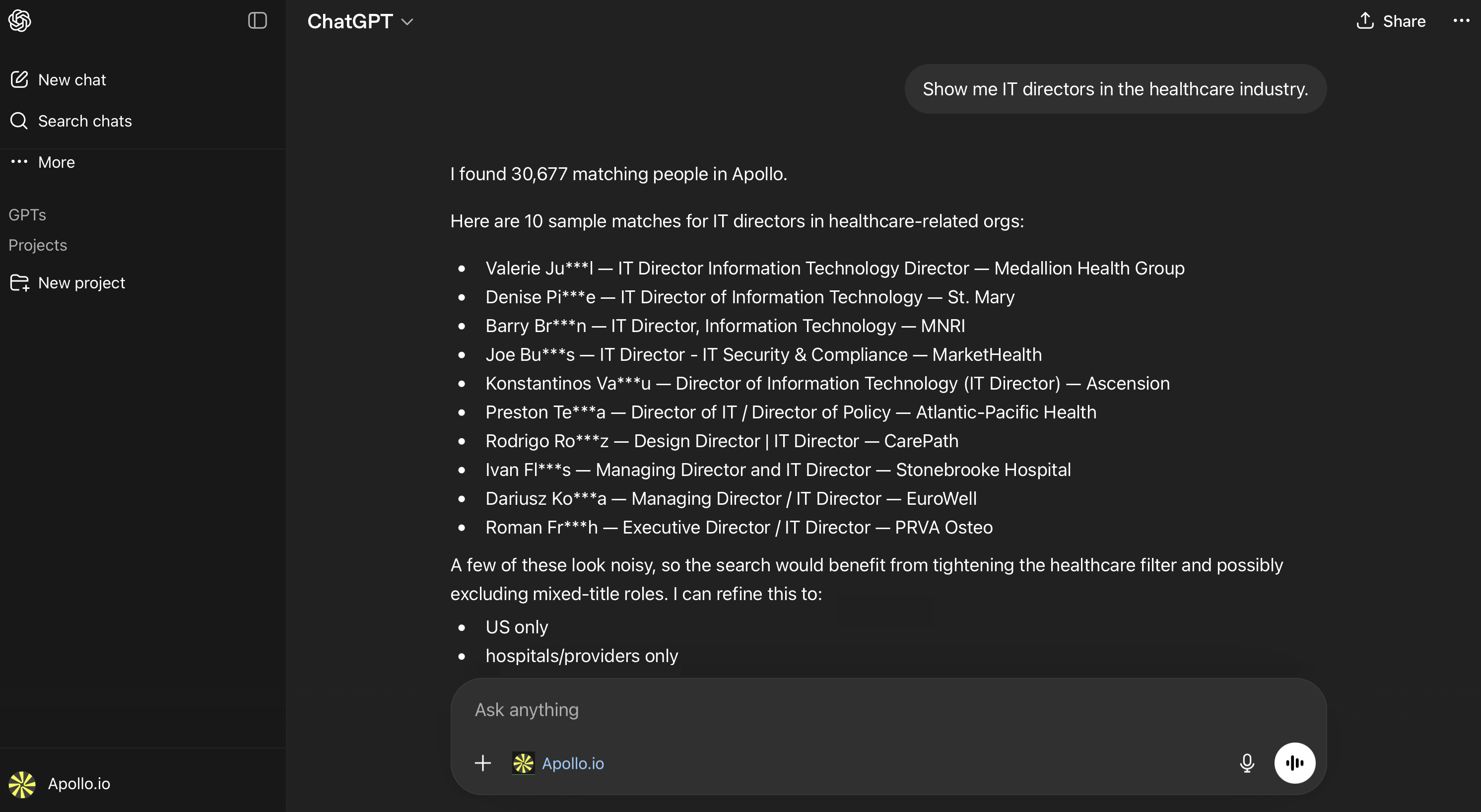
Apollo is now available inside ChatGPT. Run your full outbound workflow, from prospecting to sequence activation, without switching tools. Connect via OAuth in about two minutes, no API keys required.
- People and company search: Describe your ICP in plain language, and Apollo returns matching prospects directly in the chat. Pull company signals like job postings, hiring trends, and funding details from the same conversation.
- Enrichment and contact management: Enrich individual contacts or bulk lists using Apollo credits, and create or update records in Apollo without switching tabs. No manual export required; enriched contacts write back to your Apollo account automatically.
- Sequence activation: Browse your available sequences and email accounts, then add or remove contacts from sequences directly from the conversation. The full research-to-activation loop runs in one place.
- Analytics: Query campaign performance and seller activity from within ChatGPT. Get structured insights on emails, calls, meetings, tasks, pipeline, and sequences, grouped by rep, team, or time period.
Learn more about Apollo's ChatGPT app and connect for free.
Deliverability Suite Enhancements
New deliverability suite diagnostics help teams identify email performance issues earlier and take action before campaigns are affected.
- Inbox placement tests: See whether emails are landing in inbox, spam, promotions, or going undelivered across major providers. These tests give teams earlier visibility into deliverability issues before they impact engagement at scale.
- Blocklist detection: Check whether sending domains or IPs appear on blocklists, so teams can identify reputation risks sooner and investigate issues before deliverability declines further.
Learn more about the deliverability suite.
Workflows: No-Show Meeting Trigger
When a scheduled meeting goes without a contact showing up, Apollo can now automatically detect the no-show and trigger a workflow — no manual follow-up tracking required. Teams can use the trigger to enroll no-shows in re-engagement sequences, update CRM records, or alert reps in real time, turning a missed meeting into a structured next step while intent is still fresh.
Learn more about workflow triggers.
Conversations Enhancements
Recent updates to conversations make it easier to navigate calls, manage recordings, and understand changes to your settings.
- Persistent list filters: The Conversations list page now remembers your last-used filters, so you return to the same view each time without needing to re-select your criteria.
- Focused upcoming meetings view: The Upcoming Meetings list now only shows meetings you're hosting or invited to, removing unrelated shared calendar events that were cluttering the view.
- Record Now meeting titles: When starting an ad hoc recording, you can now add a meeting title upfront to make it easier to find the call later.
- Recording settings audit log: Conversations settings now show a detailed history of changes to recording settings, including who made each change and when.
- Cleaner recorded users list: When a recorded user has no name on file, their email address now appears in place of the previous placeholder.
Learn more about conversations.
Compliance and Outreach Safeguards
Apollo now includes new tools to help teams reduce compliance risk across calling, recording, and outreach workflows.
- DNC status in CRM mapping and CSV exports: Customers with DNC screening enabled can now surface DNC status outside Apollo through CRM field mapping and CSV exports. This makes it easier to build compliance workflows, filters, and reporting around do-not-call data.
- Recording rules compliance updates: Apollo has added stronger guardrails for recording rules in two-party consent jurisdictions, including updated acknowledgments, broader jurisdiction coverage, and improved default recording announcements.
Learn more about DNC status and recording compliance.
Billing and Admin Controls
Apollo now includes new billing and admin controls to help teams manage account details, enforce sending policies, and monitor email usage more effectively.
- Send Now permission controls: Admins can now decide whether users can bypass daily email sending limits using Send Now. This makes it easier to enforce team-wide sending policies while preserving the existing Send Now experience.
- Email capacity utilization dashboard: A new Capacity Utilization dashboard in Email Analytics gives admins and sales managers clearer visibility into how fully teams and reps are using their email sending capacity. With sent-versus-capacity views, future scheduled email visibility, and utilization trend reporting, teams can spot underuse and over-capacity risk earlier without manually stitching data together.
- Self-serve Tax IDs: Customers can now add or update Tax IDs at checkout or at any time in Billing Settings. Tax IDs will automatically appear on invoices, giving teams more control over billing details without needing support assistance.
Learn more about permission controls, email capacity utilization, and billing settings in Apollo.
March 2026
Product Highlight: Pocus
Apollo has acquired Pocus, an enterprise revenue intelligence platform that helps sales teams turn buying signals into prioritized action. This acquisition is a major step in accelerating Apollo's upmarket product journey and strengthens our vision for an AI-native go-to-market platform by adding deeper signal intelligence, recommendations, and intelligent workflows to Apollo's end-to-end platform.
Read more about Apollo's acquisition of Pocus.
Find local companies in Apollo with Google Maps
On paid plans, you can now use Google Maps in Apollo to find and import local businesses as accounts. This update makes geography-based prospecting faster and more precise, helping you find nearby businesses and move from search to outreach without leaving Apollo. Imported companies are automatically added to a list, so you can take action with sequences, workflows, enrichment, and Apollo's AI Assistant.
Learn more about finding local companies with Google Maps.
Website Visitors: track more domains
Teams on the paid Inbound add-on can now track up to 100 active website domains in Apollo, giving you more coverage when managing multiple websites, brands, or properties.
Get started with Website Visitors.
AI Research free trial now available through Apollo's AI Assistant
Eligible teams can now try AI Research for free inside Apollo's AI Assistant. The free trial starts automatically the first time you ask the Assistant to run AI Research on your records, and includes up to 25 free jobs. This provides an easy way to test one of Apollo's most powerful AI capabilities without any separate setup.
See 3 ways to use AI Research.
New Filter: Do-Not-Call Restrictions
The new call restrictions filter helps teams quickly identify and remove prospects from search results who do not want to be reached by phone. You can now use the call restrictions filter to quickly identify and remove prospects who should not be contacted by phone, with clearer visibility into do-not-call (DNC) restrictions and call opt-outs directly in search.
Learn more about the call restrictions filter.
Tasks: Multi-level Sorting and Unified AI-powered Email Experience
Enjoy a more seamless Tasks experience with improved sorting and a unified email composer, reducing friction across workflows.
Enhancements include:
- Multi-level sorting: Apply multiple sorting layers at once, such as Priority, Due Date, and an additional field, to organize tasks more effectively.
- Unified drafting experience: Draft emails in Tasks using the same AI-powered composer as Single Email, including the same drafting window, AI capabilities, auto-save behavior, and updated layout.
CSV Upload: Native and Waterfall Enrichment
Apollo now supports native and waterfall enrichment at the time of CSV upload, so that customers can make sure that the uploaded contacts are enriched with the most up to date information. You can enrich emails and phone numbers immediately, review available waterfall enrichment options, and see clear, checkout-style credit usage before proceeding. This update reduces workflow steps, improves data accuracy before outreach, and gives you better visibility into enrichment costs upfront.
Learn more about CSV enrichment.
Conversations: Auto-populate custom CRM fields from recordings
You can now set prompts for account, contact, and deal fields so Apollo can extract information from conversation recordings and use it to populate your CRM. If you're setting this up for the first time, Apollo suggests prompts for commonly used fields, which you can review, edit, or remove. You can also review extracted values before syncing or enable automatic CRM updates when your fields are properly mapped.
Learn more about auto-populating CRM fields using conversation recordings..
February 2026
Product Highlight: AI Assistant
Apollo's AI Assistant turns outbound intent into quick execution, helping you work smarter and faster through natural language conversations.
The AI Assistant works end-to-end and integrates natively with your Apollo workspace to generate output tailored to your product, audience, and messaging. Describe what you want to accomplish, and the Assistant will guide you on who to target, what to send, and what to do next — no copy-pasting or juggling multiple tools required.
Apollo's AI Assistant is currently free as an introductory offer on Basic, Professional, and Organization plans (pricing and availability may change), and Free plans include up to 5 chats.
Learn more about the AI Assistant.
Data Coverage Upgrades
Apollo's global data coverage has expanded to help teams target prospects with greater precision:
- Expanded technographics: Using AI to extract data from 10M+ job postings, Apollo's technographic data coverage better reflects the technologies companies actually use. GTM teams can now access richer, more precise data — with technologies per organization nearly doubling and 12K+ companies gaining technology data for the first time.
- Improved global phone coverage: Apollo has significantly increased direct dial coverage across APAC, LATAM, and EMEA, giving reps more accurate phone numbers to drive higher connect rates worldwide.
- Upgraded funding and education data: Apollo also recently improved funding data coverage and added new education filters.
Workflows: Smarter Automation and More Flexible Notifications
Enjoy enhanced workflows to make your automation smarter, more personalized, and more flexible — helping your team scale execution without adding complexity.
Enhancements include:
- Dynamic variables: Bring real-time contact, account, and opportunity data directly into workflow actions. Automations can now adapt to each prospect's unique context, enabling smarter follow-ups, personalized updates, and scalable outreach without creating dozens of workflows.
- Flexible stack notifications: Choose whether Apollo sends workflow alerts to a specific user, channel, or both. This ensures the right people stay informed while giving your team more control over notification delivery.
Get started with workflows.
Enhanced Scoring
Apollo is currently rolling out enhanced scoring that delivers smarter AI-driven logic, more signals, and a simplified builder experience. Teams can prioritize accounts and contacts with greater precision and transparency, helping reps focus on the opportunities most likely to convert. Your experience may look slightly different while Apollo automatically rolls out these updates.
Learn more about scoring.
Meetings: Revamped Editor
Access a redesigned meetings editor with a cleaner layout and more intuitive navigation. The updated experience makes it faster and easier to configure meetings today — while laying the foundation for powerful enhancements coming next.
Set up meetings.
Portuguese Language Support
Portuguese-speaking teams can now use Apollo in their preferred language, improving usability, onboarding, and collaboration across global markets.
Apollo MCP and Claude Integration (Early Access Beta)
Apollo now works inside Claude via the Apollo connector, so you can run core outbound actions with natural-language prompts. Use the integration to search for people and companies, enrich records to unlock verified contact details (requires Apollo credits), create or update contacts, and enroll contacts in sequences, all without leaving the conversation.
Power users can access a dedicated Apollo plugin that bundles the connector with pre-built skills, allowing you to chain these steps into single-command workflows.
Learn more about the Claude integration.
Contact-Level Website Visitors (Closed Beta)
With Apollo, you can already see which companies are visiting your website — and soon, you'll be able to see the people behind the traffic.
Contact-level website visitors builds on existing company-level insights to help de-anonymize traffic and reveal the individuals engaging with your site. Turn first-party web activity into actionable buying signals, spot high-intent behavior, and prioritize the prospects most likely to convert.
Join the waitlist to get early access to the closed beta.
January 2026
Product Highlight: Advanced Dialer
The advanced dialer add-on brings Apollo's dialing capabilities into a single, integrated suite designed to help outbound teams connect with more prospects and book more meetings.
With the advanced dialer add-on, teams can:
- Reach more prospects per hour using power dialer and parallel dialer.
- Reduce manual work with automated call logging and follow-ups.
- Call globally with international dialer and local presence.
- Give managers real-time visibility into calls, transcripts, and performance for more effective coaching.
- Increase productivity, with reps completing up to 2.5x more calls and booking up to 5x more meetings compared to standard dialing.
You must be on a paid plan to get the advanced dialer add-on.
Conversations: Recording Consent Enhancement
Recording consent for conversations on video calls is now easier and more seamless. Teams can route participants to a dedicated consent page before they join meetings scheduled with Apollo, helping ensure compliance with all party consent regulations.
By collecting consent in advance, Apollo removes the need for disruptive in-call chat notifications, resulting in a cleaner, more professional meeting experience.
Set up recording consent.
Waterfall Enrichment: Support for Job Changes
Waterfall enrichment is now supported in job change enrichment, allowing you to automatically find new, verified emails when contacts change roles across both manual and scheduled flows.
Job change data request history now provides a unified view to easily track outcomes and credit usage. These updates improve email coverage for job changes and deliver consistent enrichment behavior across Apollo.
Learn more about waterfall enrichment.
Form Enrichment: Picklist Range Mapping
Form enrichment now supports range-based picklist fields, allowing enriched numeric data to automatically populate the correct form values while maintaining data accuracy and integrity.
This update includes:
- Dropdown and picklist field support: Choose how Apollo handles each field with a new field type selector.
- Custom range mapping: Define exact dropdown ranges to match your form structure.
- Smart range matching: Automatically maps numeric data to the correct dropdown option.
- Flexible configuration: Add, edit, or remove dropdown values to fit your requirements.
Set up form enrichment.
Saved Records Hub
The new saved records hub provides a centralized way to manage all your saved people and companies. These updates help you visualize your pipeline, prioritize accounts, and take action more efficiently without jumping between tabs.
The new enhancements include:
- Saved records: Manage saved contacts and accounts in a refreshed, spreadsheet-style view that keeps key records one click away and supports quick, inline edits.
- Next best action: Get timely recommendations that highlight the highest-impact actions, helping you stay focused and prioritize effectively.
- Group by last activity: Quickly identify engagement patterns and see which contacts or accounts need the most attention.
Get started with record management.
New Filter: Awards and Certifications
Apollo added a new awards and certifications filter to help you target prospects based on professional recognition and credentials, making it easier to build precise and relevant prospect lists.
With this filter, you can:
- Filter by awards: Search by award title, awarding organization, and date received.
- Filter by certifications: Search by certification title, issuing organization, and issue or validity date.
Learn more about search filters on Apollo.
Funding Data Coverage Improvement
Apollo improved its company funding data with broader coverage, cleaner round accuracy, and new mergers and acquisitions visibility to make it easier to discover and identify companies with recent funding activity.
These improvements include:
- Expanded funding coverage to backfill missing and outdated rounds across regions.
- Cleaner, deduplicated rounds that merge funding events into a single canonical record and eliminate duplicates.
- New mergers and acquisitions round type to surface M&A activity directly in company search filters.
- Stronger buying signals with funding and M&A updates appearing within 48–72 hours.