
Overview
The Perplexity integration is in beta. Product functionality and pricing may change.
If you use Perplexity, connect Apollo and run your full GTM workflow without leaving the conversation. Do most everything you do in Apollo, inside Perplexity.
In one chat, you can:
- Find prospects using natural language
- Enrich people or companies
- Create or update contacts
- Draft and send one-off emails
- Create sequences, improve steps, and generate variants
- Add contacts to a sequence
- Create and manage tasks
- Analyze your team's activity and campaign performance
Apollo remains your system of record, while Perplexity becomes the space where work gets done. Everything runs on your existing Apollo permissions, plan limits, and credit balance.
That means you can go from idea to execution without switching tools or breaking your workflow. And setup is simple: connect Apollo in Perplexity to start working in any conversation.
With Apollo MCP, your Apollo permissions, plan, and API rate limits still apply.
Some actions on Apollo MCP consume credits. Review credit usage by action.
Using Apollo MCP requires you to sign in to Apollo with a work email address, like name@company.com. Free or personal email addresses, like Gmail or Yahoo addresses, aren't supported.
Integrations on Perplexity require a Perplexity Pro plan or higher.
Check out the following sections to connect and use Apollo with Perplexity.
Connect Apollo to Perplexity
Apollo prohibits model training with Apollo MCP integrations. Before you connect Apollo to Perplexity, you must opt out of AI training in your Perplexity settings.
To connect Apollo to Perplexity:
- Launch Perplexity, then log in or create a new account.
- Click Customize, then search for the
Apolloconnector. - Click Add connector.
- Review the permissions, and click Authorize.
The Perplexity integration is user-specific and must be set up separately by each person rather than at the team or admin-level.
You have now connected Apollo to Perplexity, and you're ready to use the integration.
Use Apollo on Perplexity
Once connected, using Apollo in Perplexity is as simple as having a conversation. There are no special commands or complex prompts required. Just describe what you want to do, and Perplexity uses your Apollo account to complete the action.
Perplexity can only perform actions in Apollo that you can perform yourself based on your permission profile, Apollo plan, and credit availability. If you can't do it, Perplexity can't either.
To use Apollo on Perplexity:
- Start a new chat and type
@then select Apollo. - Alternatively, click + > Connectors and sources, then check Apollo.
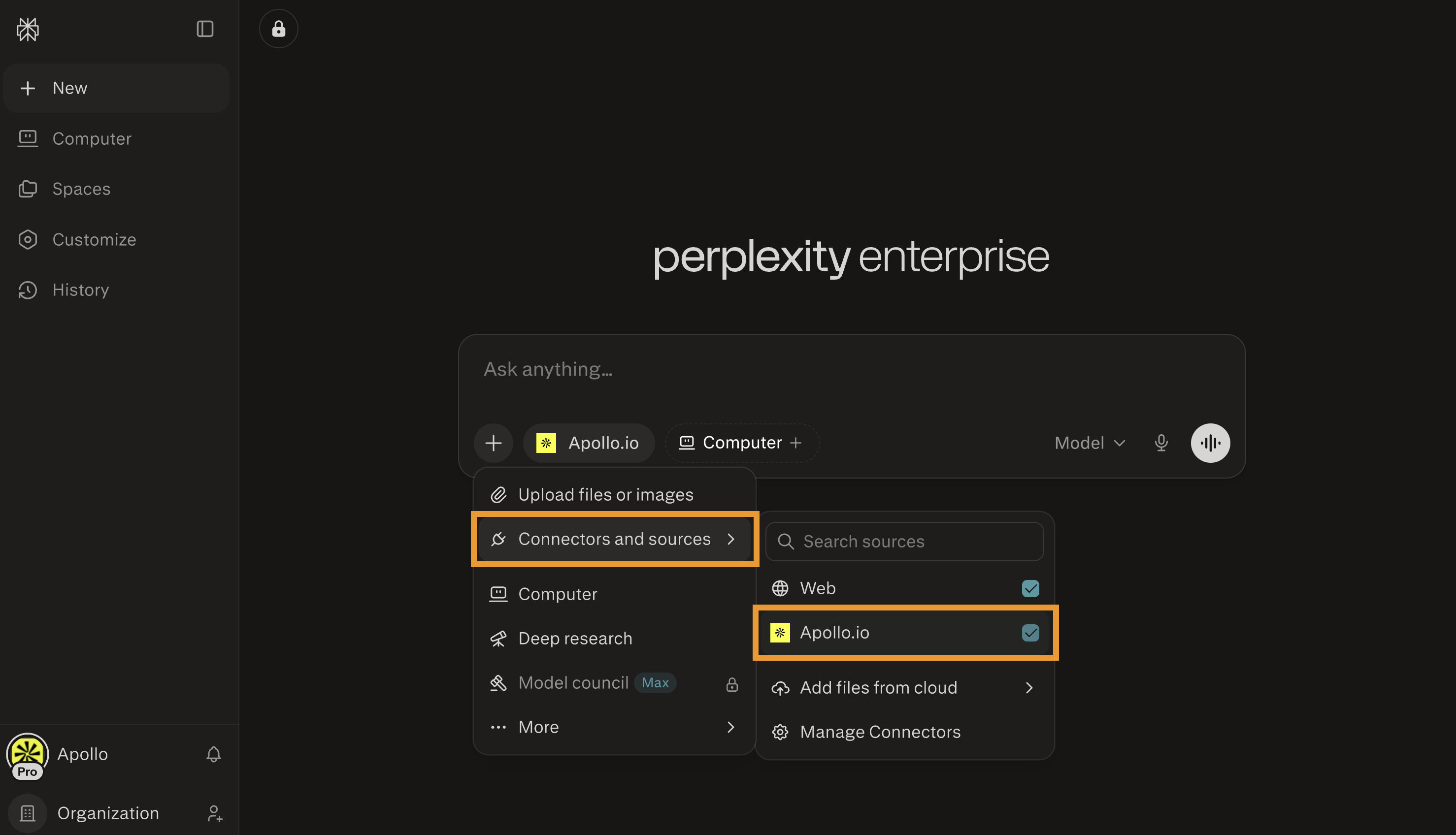
- Use natural language to describe your request or goal. Perplexity translates your request into action using Apollo.
- Follow these best practices to get the best results:
- Be specific about titles, industries, locations, and company size to improve search accuracy.
- Review actions before enrolling large groups into sequences.
- Orchestration is key. Use follow-ups to refine searches and chain actions. For example: "Narrow this to companies using Sumware Software, then find decision makers."
- Use company domains for enrichment. When enriching a person or company, include the company's website domain to help Apollo find the right match. For example: "Enrich Maya Chen, Head of Sales at sumwaresoftware.io."
- Enrich after searching. Searching for new people returns profiles without full contact details. Follow up with a request like: "Enrich the top three results."
- Enrich one company at a time. For best results, enrich contacts from one company per request instead of mixing multiple companies.
- Review sequence drafts before publishing. Ask Perplexity to preview changes before it creates or updates a sequence in Apollo. Confirm the sequence, sender, and enrollment steps separately.
- Check your mailbox before adding contacts to sequences. Ask Perplexity to list your email accounts so you can choose which mailbox or mailboxes to send from. If you haven't already, link your mailbox to Apollo.
- Review task actions before you complete or skip them. Completing or skipping tasks can affect your Apollo task queue and sequence progression, so check the task details before confirming the action.
- Use deduplication when creating contacts. Ask Perplexity: "Create this contact with dedup enabled" to avoid duplicates in your CRM.
- Here are a few example requests to help get you started:
| Examples | |
|---|---|
| Search for people | Search for companies |
| Create or update contacts and accounts | Enrich contacts and accounts |
| Send one-off emails | Create sequences and variants |
| Add contacts to sequences | Manage tasks |
| Analyze your performance | |
Search for people
Find VP-level marketing leaders at SaaS companies in North America.
Show me IT directors in healthcare companies.
Search for founders in fintech companies based in New York.
Perplexity returns matching prospects. Search results show names and job titles but don't include email addresses or phone numbers. Save contacts, and use enrichment to reveal contact details.
Search for companies
Find SaaS companies in North America with 500–1,000 employees.
Show me healthcare companies hiring for IT roles.
Search for fintech companies based in New York.
Perplexity returns matching companies in Apollo. Company search results include firmographic details like industry, size, and location. Save accounts, and use enrichment to pull additional data.
Create or update contacts and accounts
Create a contact for Jane Smith at Sumware Software, VP of Sales.
Update this account to reflect 500 employees.
Change this contact's title to Senior Director of Operations.
Perplexity creates new contacts or accounts, or updates existing ones directly in Apollo.
Enrich contacts and accounts
Enrich this prospect and verify their email address.
Pull updated firmographic data for ACME Company.
Perplexity refreshes contact and company records using Apollo enrichment.
Send one-off emails
Draft a one-off email to this contact about scheduling a follow-up next week.
Send an email to this contact using the subject line "Following up on our demo."
Draft an email to this contact and CC the account owner.
Send this follow-up as a one-off email and BCC my manager.
Perplexity creates and sends one-off emails to contacts in Apollo. You can ask Perplexity to write the message, customize the subject line, choose the recipient, and add Cc or Bcc recipients before sending.
Create sequences and variants
Create a 4-step outbound sequence for VP-level marketing leaders at SaaS companies.
Improve steps 2 and 3 in this sequence to make them shorter and more personalized.
Create personalized variants of this sequence for IT, finance, and operations personas.
Preview the changes before you update the sequence in Apollo.
Perplexity helps you draft new sequences, improve selected steps, generate variants for different segments or personas, and preview changes before they are pushed to Apollo. Review and approve sequence updates before publishing, then confirm senders and enroll contacts as separate steps.
Add contacts to sequences
Add these contacts to the Q1 Outbound Sequence.
Enroll this prospect in the Enterprise Follow-Up sequence starting tomorrow.
Remove this contact from all active sequences.
Perplexity enrolls or removes contacts from existing sequences on Apollo. Confirm the sequence, sender, schedule, and contacts before enrolling prospects.
Manage tasks
Show my open call tasks.
Find my high-priority LinkedIn tasks.
Create manual email tasks for these 10 contacts.
Mark this task complete with the note: "Sent LinkedIn connection request."
Perplexity can search, review, create, complete, or skip tasks on Apollo based on your Apollo permissions. Review task details before completing or skipping tasks, since those actions can affect sequence progression in Apollo.
Analyze your performance
Which reps have the highest call connect rate this quarter?
Show me how our email reply rate is trending week over week.
Which sequences have the highest reply rate in the last 6 months?
Give me a full activity summary for each rep this quarter.
Perplexity queries Apollo Analytics and returns structured insights on emails, calls, meetings, tasks, pipeline, and sequences. Results are grouped by rep, team, time period, and more, helping you track performance and compare outcomes.
If an action isn't working or doesn't appear in Perplexity, try disconnecting and reconnecting Apollo.
Depending on the action you take, this integration may use credits on Apollo. Review credit usage by action to learn more.
You have now used Apollo on Perplexity.
Prefer terminal workflows? Use Apollo CLI to search and enrich people and companies, manage contacts and accounts, work with sequences and tasks, pull analytics, and export results in JSON, CSV, YAML, JSONL, or table format. The CLI is best for technical users who want scriptable, repeatable Apollo workflows outside the browser.
Next Steps
Now that Apollo is running inside Perplexity, here are a few ways to level up how you search, enrich, and automate what happens next.
| Integrate Apollo with ChatGPT | Prefer to text with ChatGPT? Connect Apollo to ChatGPT to run full GTM workflows directly inside your conversations. |
|---|---|
| Integrate Apollo with Claude | Prefer working in Claude? Connect Apollo to Claude to search, enrich, and take action on prospects in a different AI workspace. |
| Use the AI Assistant on Apollo to Sell Smarter | Want to use AI inside Apollo too? Use the AI assistant on Apollo to refine ICP filters, surface better-fit prospects, and take action faster across your workflows directly in Apollo. |
| Enrichment Overview | If you need cleaner data before you enroll prospects, enrich contacts and accounts on Apollo to verify emails, refresh firmographics, and keep your team's outreach accurate and up to date. |
| Create and Assign Permission Profiles | Rolling Apollo + Perplexity out to your team? Create and assign permission profiles to control who can search, enrich, and enroll prospects when working through Perplexity. |
| What Are Credits? | If you plan to scale enrichment and automation, understand how credits work on Apollo to manage usage, avoid surprises, and keep your Perplexity-driven workflows running smoothly. |