
Overview
Connect Apollo with the tools your teams already use to manage customer data, communicate with prospects, and run workflows. Integrations help you keep records aligned across systems so you can prospect, engage, and act on Apollo data without changing how or where you work.
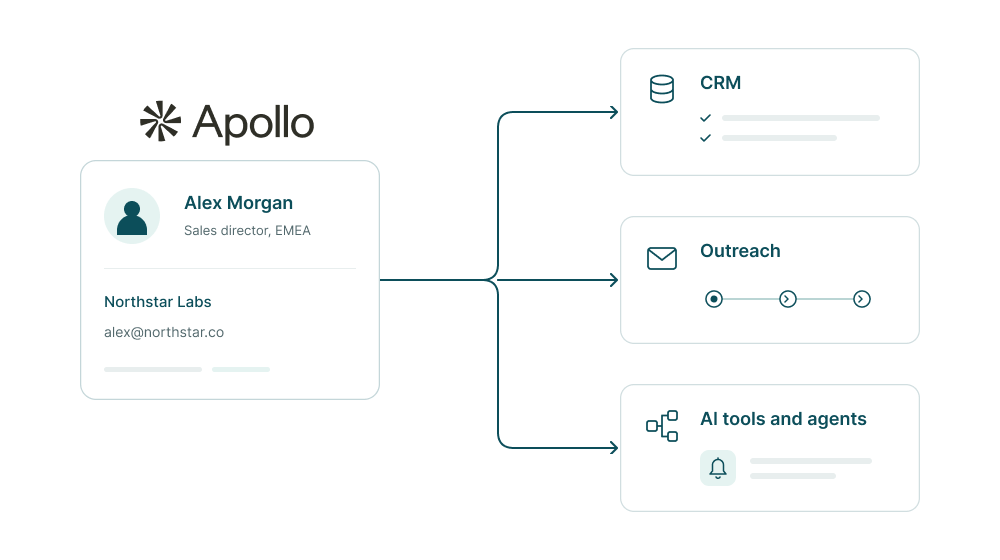
For an exhaustive list of all the available integrations, see integrations on Apollo.
Check out the following sections to connect your integrations and apps.
Connect Your CRM
A CRM is software your team uses to manage customer records and sales activity. Connect Apollo to your CRM to keep your data up-to-date and available across both systems. Your team can use CRM data when prospecting and engaging in Apollo, then sync enriched, qualified records and selected activity back to your CRM.
You can only connect one CRM at a time, so confirm which CRM your team uses as its system of record before you connect it.
Select your CRM to review its setup guide.
| CRM | Bidirectional | What syncs | ||
|---|---|---|---|---|
| Salesforce | ✓ |
|
||
| HubSpot | ✓ |
|
||
| Microsoft Dynamics | ✓ |
|
||
| Pipedrive | ✓ |
|
||
| Zoho | ✓ |
|
The HubSpot integration includes two variations:
- HubSpot CRM: Use this version to sync contacts, accounts, deals, and activities between HubSpot and Apollo.
- HubSpot Data Enrichment: Use to enrich existing HubSpot records only. It doesn't sync or push records or activities.
Connect Outreach Apps
Use Apollo to find and enrich prospects, then connect the engagement platform or sending provider your team already uses to execute outreach.
| Tool | Use it to . . . |
|---|---|
| Outreach | Push Apollo contacts to Outreach and add them to Outreach sequences. Contacts you push from Apollo stay synced with corresponding Outreach fields. |
| Salesloft | Push Apollo contacts to Salesloft and add them to Salesloft cadences. Contacts you push from Apollo stay synced with corresponding Salesloft fields. |
| SendGrid | If you already use SendGrid, send higher-volume email from Apollo through an existing SendGrid account and review selected delivery events in Apollo. |
| Mailgun | If you already use Mailgun, send higher-volume email from Apollo through an existing Mailgun account and track delivery performance for connected domains. |
Connect Your AI Tools
Apollo works with the AI tools you already use. Connect Apollo and find prospects, research companies, enrich records, and take action with natural-language requests.
| AI tool | Use Apollo to . . . |
|---|---|
| ChatGPT | Find prospects, research companies, enrich contacts, manage records, and create outreach with natural-language requests. |
| Claude | Discover prospects, research companies, enrich contacts, manage records, and create outreach with natural-language requests. |
| Perplexity | Get prospects, research companies, enrich contacts, manage records, and create outreach with natural-language requests. |
| Cursor | Build GTM apps, scripts, and dashboards with Apollo data from your code editor. |
| Replit | Build apps, dashboards, prototypes, and GTM tools with Apollo data. |
Connect Workflow and Collaboration Apps
Connect Apollo where you collaborate and automate work.
| Tool | Use Apollo to . . . |
|---|---|
| Slack | Work with Apollo in Slack, receive agent recommendations and task updates, and share timely prospecting activity with your team. |
| Zapier | Connect Apollo with Zapier-supported apps to automate workflows and move data across your GTM stack. |
| Workflow integrations | Connect third-party apps to Apollo workflows to route records, send notifications, create follow-up work, and automate handoffs. |
Next Steps
Your integrations are connected. Now put your data to work with focused outreach and repeatable prospecting.
| Sequences Overview | Build multi-step sequences to give your team a consistent way to reach the right prospects. |
|---|---|
| Add Contacts to a Sequence | Add qualified contacts to a sequence to turn enriched records into timely, coordinated outreach. |
| Configure a Sequence Sending Schedule | Set a sequence sending schedule to reach prospects when your team wants emails to go out. |
| Create a Persona | Create reusable personas to keep your team focused on the buyers most likely to engage. |